> ## Documentation Index
> Fetch the complete documentation index at: https://docs.membase.so/llms.txt
> Use this file to discover all available pages before exploring further.
# Poke
> Connect Membase to Poke via MCP integration. Add persistent, cross-session memory to your Poke AI assistant for smarter, context-aware responses.
Navigate to [Poke.com > Integrations](https://poke.com/integrations/new).
| Field | Value |
| ---------- | ---------------------------- |
| Name | `Membase` |
| Server URL | `https://mcp.membase.so/mcp` |
The API Key field is optional. You can leave it empty since Membase uses OAuth for authentication.
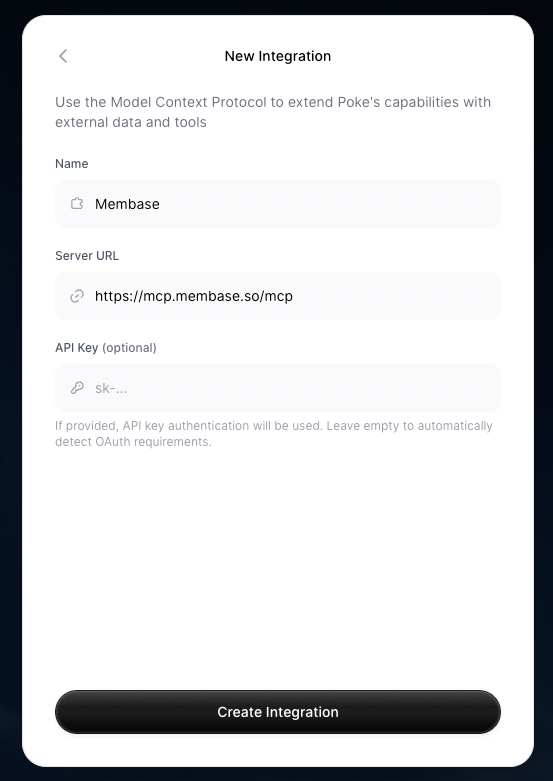 Complete the OAuth flow in the browser.
## Next Steps
Import chat history, connect apps, and more.
Chat with Memory, agent retrieval, and dashboard exploration.
Store factual knowledge alongside your memories.
See every MCP tool your agent can call.
Complete the OAuth flow in the browser.
## Next Steps
Import chat history, connect apps, and more.
Chat with Memory, agent retrieval, and dashboard exploration.
Store factual knowledge alongside your memories.
See every MCP tool your agent can call.