


How It Works
Once installed, Auto-Capture runs automatically with no extra configuration:- Auto-Capture (on by default): After conversations, user and assistant messages are buffered and saved as original transcript documents in Membase Wiki.
- Auto-Recall (off by default): When enabled, the plugin searches memory context before every AI turn and injects relevant snippets. Casual chat is skipped to keep things focused.
- Auto Wiki Recall (off by default): When enabled, the plugin also prefetches wiki documents before every AI turn for factual context and references.
- Knowledge Graph: Unlike simple vector memory, Membase organizes entities, relationships, and facts into a knowledge graph. Search results include related context for richer responses.
Setup
1
Install the Membase plugin
2
Log in to Membase
3
Start using Membase in OpenClaw
Membase is now active. Conversation transcripts are automatically captured to Wiki. To also inject memories before each AI response, enable Auto-Recall by asking your AI:
"Enable auto-recall for Membase".Configuring Membase
The simplest way to change Membase settings is to just ask your AI in a conversation. No need to edit config files manually. Auto-Recall (inject past memories before each response):~/.openclaw/openclaw.json and ask you to restart the OpenClaw gateway for the change to take effect. Alternatively, you can edit the config directly. See the Configuration section below.
AI Tools
The AI uses these tools autonomously during conversations. Themembase_* names below are OpenClaw’s plugin-side wrappers around the corresponding Membase MCP tools.
CLI Commands
Auto-Recall
Runs before every AI response (before_agent_start hook) when enabled.
Queries Membase for relevant memories and wiki docs and injects them as context when enabled. Casual chat (greetings, acknowledgments) is skipped. The injected context respects a maxRecallChars budget to avoid oversized prompts.
Auto-Recall is disabled by default. Enable it in your plugin config:
Auto-Capture
Runs after every AI response (agent_end hook).
Buffers user and assistant messages per channel and flushes original transcripts to Membase Wiki. Buffers flush after 5 minutes of silence or 20 messages, whichever comes first. The last 2 messages are kept as overlap for continuity across batches.
Configuration
All configuration is managed through OpenClaw’s plugin settings or~/.openclaw/openclaw.json:
OAuth login keeps stable plugin config in
~/.openclaw/openclaw.json and stores rotating tokens in tokenFile.
Legacy keys (accessToken, refreshToken) are migrated automatically when present.
Enabling AI Tools
The plugin automatically adds itself totools.alsoAllow on first load. If it doesn’t take effect, restart the gateway once.
If you prefer to configure it manually, use tools.alsoAllow (not tools.allow) to avoid breaking your existing profile allowlist:
"openclaw-membase" in tools.alsoAllow expands to all tools registered by this plugin and is appended on top of the active profile. Using tools.allow instead can silently break your profile allowlist. Without this entry, the AI still receives memory context via auto-recall but cannot call the tools explicitly.
Managing Plugins
Useopenclaw plugins to manage installed plugins, check status, and update versions.
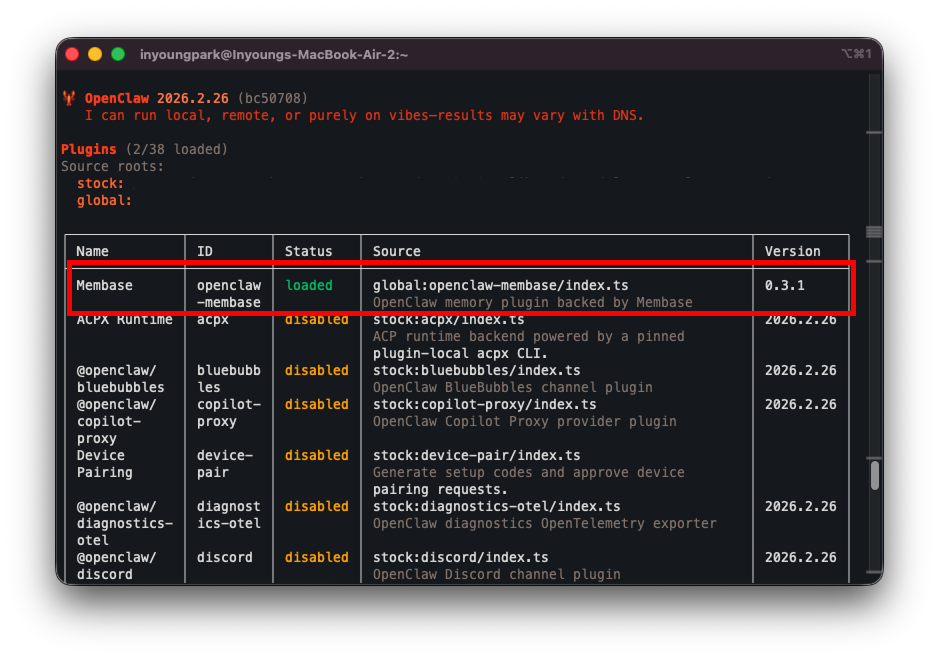
OpenClaw plugin list showing Membase loaded
Updating the Plugin
To update Membase to the latest version:How Membase Differs
GitHub Repository
Want to inspect the plugin source, track releases, or contribute improvements?openclaw-membase on GitHub
Browse the source code, open issues, and follow plugin updates in the standalone repository.
Next Steps
Bring Your Context
Import chat history, connect apps, and more.
Use Your Context
Chat with Memory, agent retrieval, and dashboard exploration.
Knowledge Wiki
Store factual knowledge as wiki documents that OpenClaw can search directly.
Membase MCP
See every MCP tool your agent can call.