

At a Glance
You don’t need to call any of these yourself. Your agent handles everything automatically based on the conversation.
Memory vs Wiki
Membase exposes two complementary stores through MCP:- Memory (
add_memory,search_memory): Personal context that describes the user: preferences, decisions, habits, ongoing projects. - Wiki (
add_wiki,search_wiki,update_wiki,delete_wiki): Factual knowledge that the user wants to keep as reference material: docs, specs, notes, and anything else that is stable and addressable by title.
search_memory and search_wiki, then combine the results. See the Knowledge Wiki guide for details.
MCP Server
Membase runs a remote MCP server accessible at:
For MCP setups, the
npx -y membase@latest --client <client> CLI command handles registration and auth automatically for supported clients. See the Agents guide for per-client setup.
Claude Code users should start with the Membase Claude Code plugin. The plugin exposes the same Membase memory and wiki tools directly inside Claude Code, plus slash commands, hooks, and project-aware workflows. The remote MCP server remains available for other clients and as a Claude Code fallback.
Tools
Membase exposes tools that agents can call during conversations. They split into two groups: memory tools for personal context and wiki tools for factual knowledge.Memory Tools
add_memory
add_memory
Stores long-term memory that persists across sessions. Agents use this proactively when the user shares durable context worth remembering: preferences, recurring habits, ongoing projects, goals, constraints, etc. Transient one-off information is skipped unless the user explicitly asks to save it.
search_memory
search_memory
Searches stored memories by semantic similarity. Agents use this when the user asks to recall something from a previous session, or proactively when past context would improve their response. Results are returned as episode-centric bundles with related context.
Results can include a relevance score (0–1) when available, indicating how closely each match fits the query.
get_current_date
get_current_date
Returns the current date and time in the user’s Membase timezone (and UTC). Agents call this before
search_memory to resolve relative phrases like “today”, “yesterday”, “this week”, or “next weekend” into ISO 8601 date_from/date_to values.This tool takes no input parameters. The response contains four fields:Projects
Memories can be grouped into projects (lightweight category/tag slugs). Bothadd_memory and search_memory accept an optional project field.
- User-driven, not inferred: Agents should set
projectonadd_memoryonly when the user explicitly mentions a project, tag, label, or category (for example, “save this underacme-rewrite”, “tag this aspersonal”). Agents must not guess or invent a project. - Known projects hint: The Membase MCP server injects the current user’s existing project slugs into each tool’s description, so agents can reuse existing slugs instead of creating new ones for the same concept.
- Filtered search: Pass
project: "acme-rewrite"tosearch_memoryto restrict results to that project. Exact slug match only. - Managed in the dashboard: Users can move memories between projects and filter by project from the Memories tab. See the Memory guide.
Wiki Tools
add_wiki
add_wiki
Creates a new document in the user’s knowledge wiki. Agents use this for factual, reference-style knowledge (documentation, specs, stable notes). Personal preferences and habits should go through
add_memory instead.Document creation respects the user’s plan quota. If the limit is reached the call returns a quota error.When the tool succeeds, agents should tell the user the returned destination when present, such as
Saved to Project: Docs or Saved to Basic.search_wiki
search_wiki
Searches the user’s wiki using hybrid search: a full-text keyword index (BM25-style) and semantic similarity, fused with Reciprocal Rank Fusion (RRF). Results include each document’s full body so the agent has enough context to answer immediately.
update_wiki
update_wiki
Edits an existing wiki document. Use
search_wiki first to resolve the document ID.When the result includes a destination such as
Moved to Project: Docs, Moved to Basic, or Current destination: Basic, agents should report it to the user.delete_wiki
delete_wiki
Permanently deletes a wiki document. This action cannot be undone; agents should ask for user confirmation before calling it.
Resources
MCP resources provide read-only data that agents can pull into their context: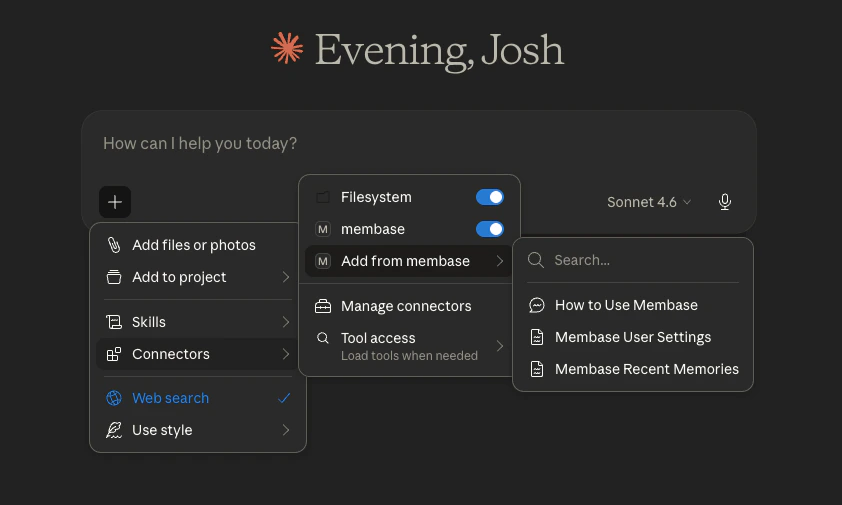
MCP resources available in Claude
Prompts
MCP prompts inject pre-built instructions and context into the agent’s system prompt:
The
start prompt can be used at session start to provide:
- Workflow guidance for memory retrieval and memory write behavior
- Safety guidance for secrets and transient information
- Resource usage guidance for profile versus recent timeline reads
Recommended Agent Behavior
Use these patterns for best results:- For questions about saved knowledge, past conversations, documents, decisions, or user-specific context, search Memory and Wiki together when both could matter. Use Memory for personal context and Wiki for factual/reference knowledge.
- For stable user settings, agents can read the MCP resource
membase://profile. It mirrors the dashboard Profile settings: display name, role, interests, custom instructions, and timezone. - For latest memory context or recent-memory timeline questions, agents can read
membase://recent. This is a Memory timeline, not a Wiki or integration changelog. - For date-filtered memory searches, call
get_current_datewhen needed, then pass explicit ISO date filters tosearch_memory. - Save durable user context with
add_memory; skip secrets and one-off transient data unless explicitly requested. - Save factual, reference-style knowledge with
add_wiki. Preserve the full artifact unless the user explicitly asks for a summary. If the user names a Project, pass it inproject; otherwise leave it empty and report the returned destination.
Connection Setup
For detailed setup instructions for each agent, see the Agents guide.Cursor
One-click install
Claude Code
Plugin recommended
Claude
Custom connector
ChatGPT
Manual config
Next Steps
Memory
Explore and manage memories.
Knowledge Wiki
Deep dive on Wiki documents, Projects, imports, and search.
Chat in Dashboard
Talk to your knowledge base without an external agent.