How context flows into Membase’s two knowledge stores (Memory and Wiki), gets structured, and comes back to your agents.
Membase transforms raw context into structured, retrievable knowledge that your agents can pull from across sessions. This page walks through the full lifecycle.
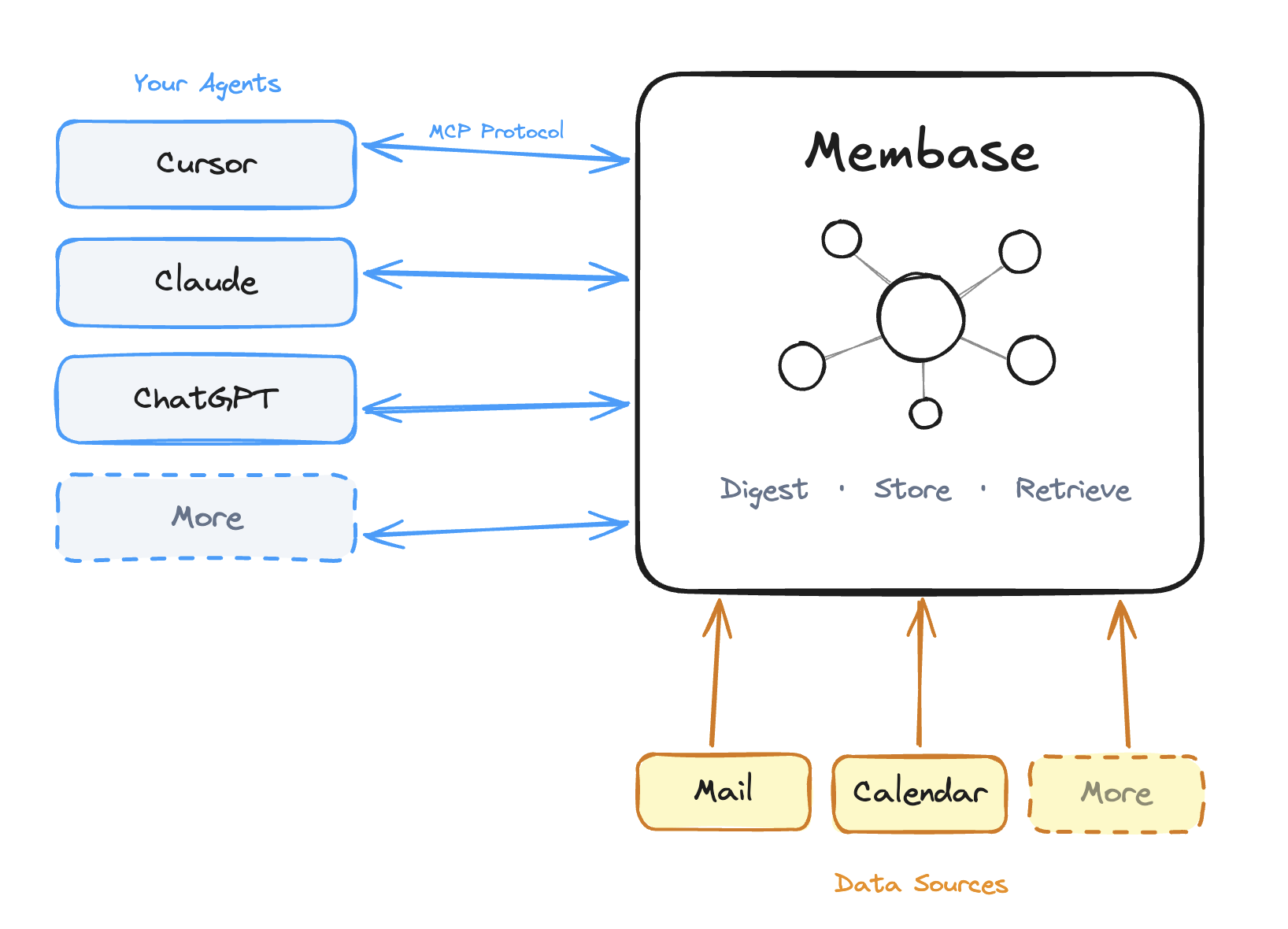
Membase keeps two complementary knowledge stores, each optimized for a different shape of information. Agents can read and write both through MCP, and Chat in Dashboard can consult both when stored context helps.
Membase architecture overview
Memory
Wiki
What it stores
Personal context: preferences, decisions, habits, meetings, emails
Markdown documents linked with [[wikilinks]], organized into Projects or Basic
Primary input
Agent conversations (add_memory), Chat in Dashboard, chat history import, app integrations (Gmail, Calendar, Slack)
You writing documents in the dashboard, Chat in Dashboard, add_wiki calls from agents, Notion live sync, Notion/Obsidian/Markdown imports, supported agent transcript capture
Primary retrieval
search_memory (semantic), Chat in Dashboard, graph and table views
search_wiki (hybrid: keyword + semantic), Chat in Dashboard, graph and table views
Context from either store flows through three stages: ingest → process → retrieve. The rest of this page walks through each stage for both stores.
Memory receives context from imports, agents, Chat in Dashboard, and integrations.
1
Chat History Import (bootstrap)
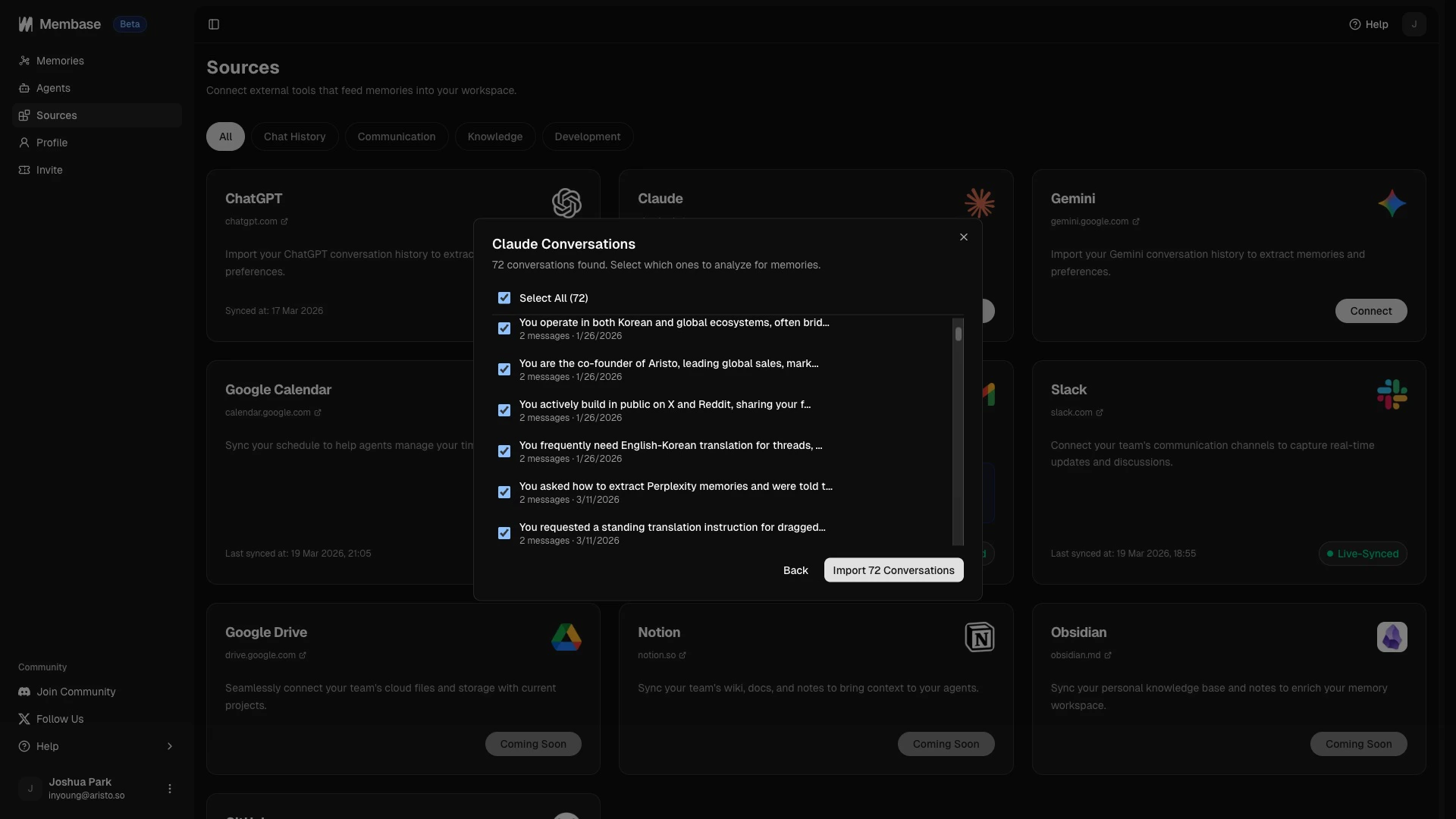
Already have months of conversations in ChatGPT, Claude, or Gemini? Export your chat history and upload it in Sources under the Chat History section. The entire archive goes through the same digesting pipeline as live conversations.
Import your existing conversations from ChatGPT, Claude, and Gemini
2
Live agent conversation
You talk to your agent normally. During the conversation the agent picks up on preferences, decisions, project details, and other durable context, and calls add_memory via MCP.
Example
You: "Let's use Zustand instead of Redux for this project. Also, I prefer functional components over class components."→ Agent calls add_memory with this context
3
Chat in Dashboard
While talking directly to your knowledge base in the dashboard, Chat can save durable personal context as memory when you share something worth keeping.
4
App integration sync
Connected sources (Gmail, Google Calendar, Slack) sync new data automatically in the background. Each message, event, or email becomes an episode.
5
Membase receives the context
Membase accepts the incoming context for processing so the agent or sync can keep moving.
Wiki receives documents directly from you, Chat in Dashboard, or agent tool calls.
1
Wiki import (bootstrap)
Already have a markdown knowledge base? Use Wiki > Add > Import files to import Notion exports, Obsidian vaults, or Markdown files into a target Project or Basic. [[wikilinks]] are preserved where available, and documents upload through the background import flow. See Importing Documents.
2
Write a document in the dashboard
Open the Wiki tab, click Add > Write document, choose a Project or Basic, and write in markdown. Manual save and unsaved-changes warnings keep your content safe.
3
Notion live sync
Connect Notion from Sources, choose the Notion pages available to Membase, then choose a target Wiki Project. Synced pages become source-backed Wiki documents. See App Integrations.
4
Agent calls add_wiki
Your connected agent can call add_wiki when you share factual, reference-style knowledge worth keeping. Example: “Write up our deployment rollback checklist” results in a new wiki document instead of a memory.
5
Supported plugin captures transcript
Supported agent plugins can preserve user/assistant conversation transcripts as original source material in Wiki, separate from extracted personal Memory.
6
Chat creates a document
Chat in Dashboard can also create wiki documents when you ask it to save factual, reference-style material.
7
Membase receives the document
The Wiki document is saved directly or prepared for background processing, depending on whether it came from a direct write, sync, or import.
How raw input becomes structured, searchable knowledge.
Memory
Wiki
Every memory (from agents or integrations) goes through the same pipeline.
1
Episode creation
The raw input is saved as an episode, a snapshot of a conversation or data event. Episodes are the building blocks of memory.
2
Entity extraction
Membase identifies key entities from the episode: people, projects, tools, preferences, decisions, dates, and other meaningful concepts.
Example entities from a conversation
"Let's use Zustand instead of Redux"→ Entities: Zustand, Redux, state management decision
3
Graph construction
Extracted entities are added to your knowledge graph. New entities connect to existing ones when they overlap, so “Zustand” mentioned in two different conversations becomes one entity with two linked episodes.
4
Deduplication and merging
If the same fact appears in multiple episodes, Membase merges them. When new information contradicts an existing memory, the latest data takes priority.
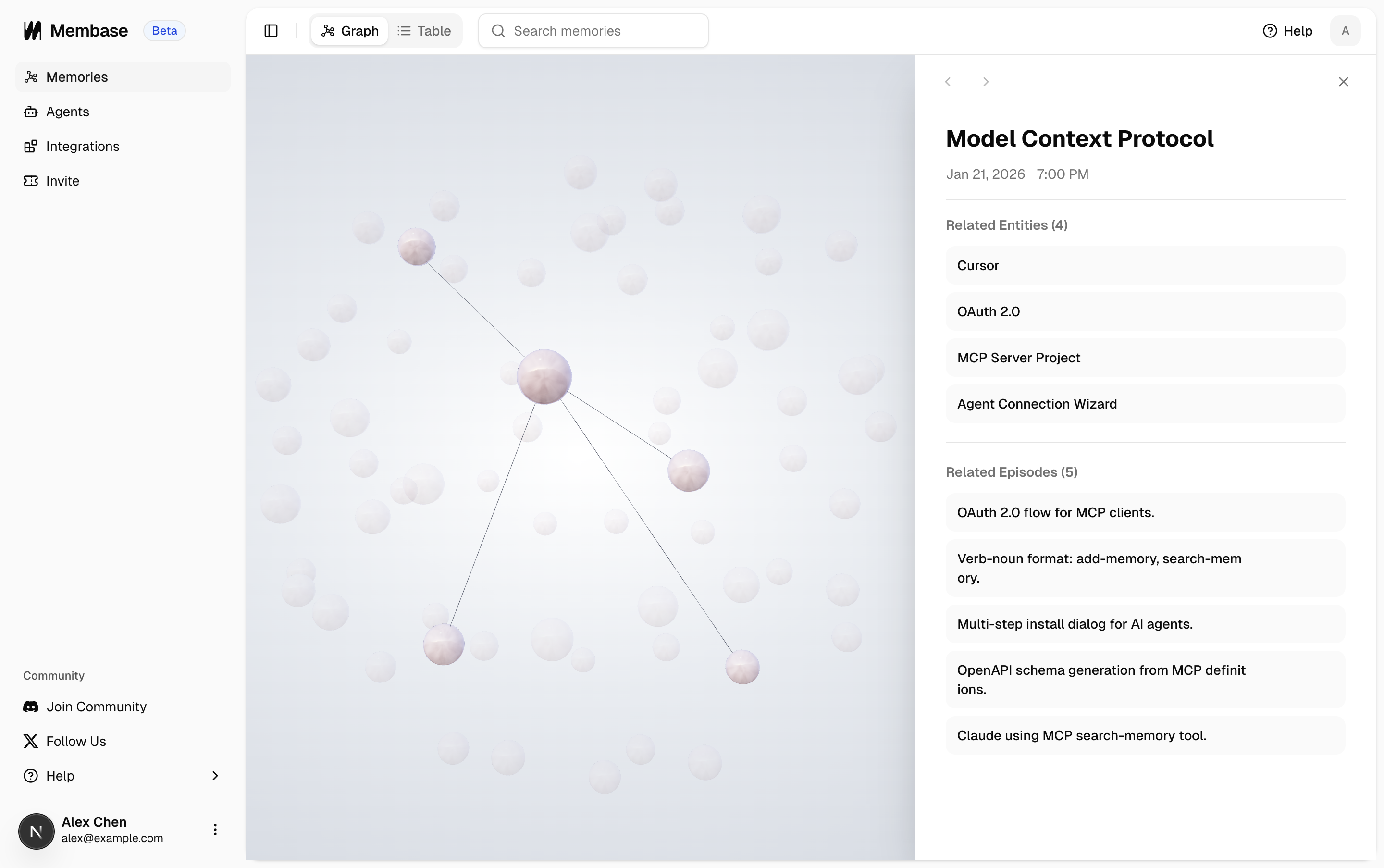
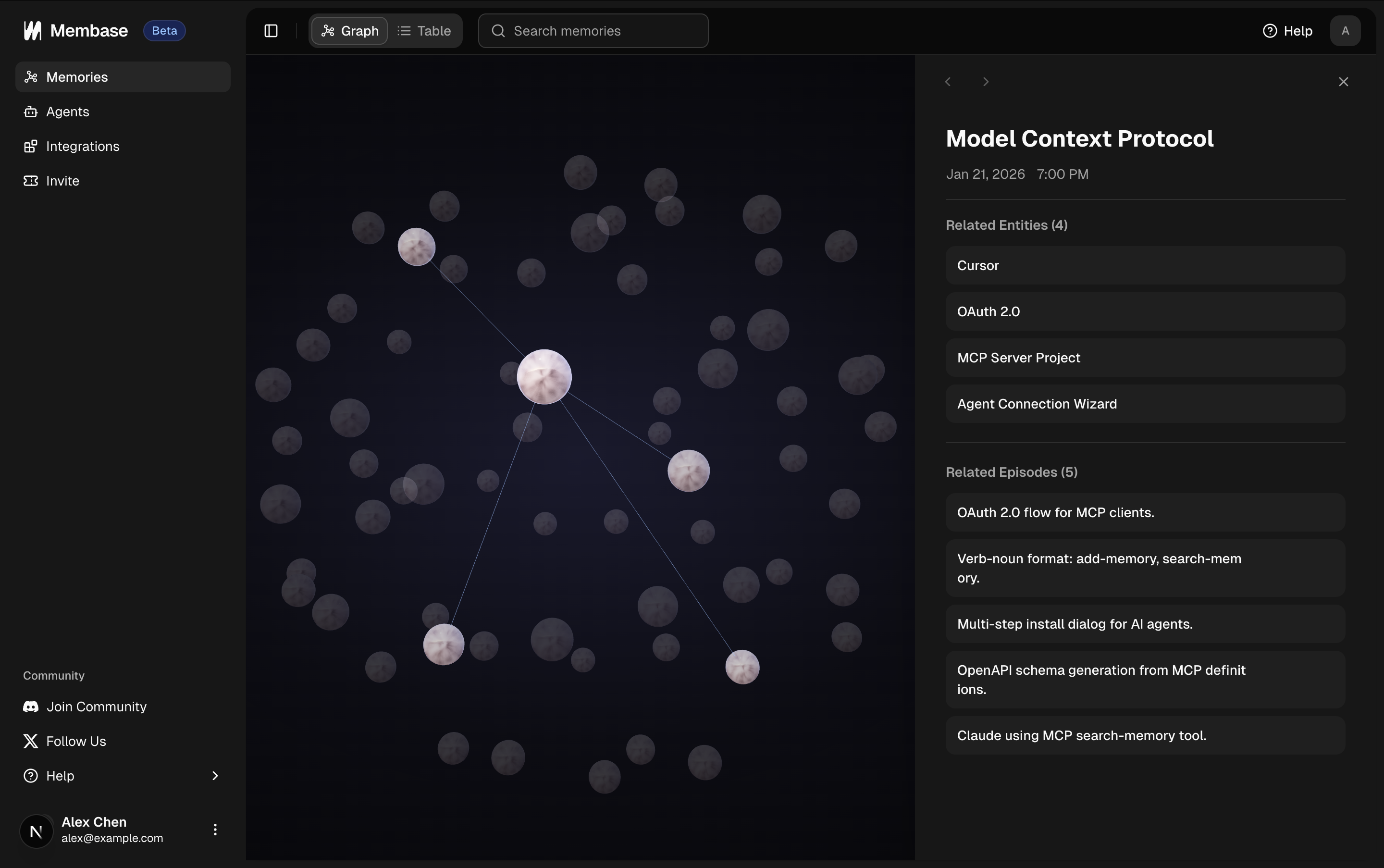
The result is a continuously growing knowledge graph where entities, relationships, and episodes are all interconnected.
Knowledge graph view in the Membase dashboard
Wiki documents are stored as markdown plus structural metadata for fast retrieval.
1
Document storage
The document’s title and markdown content are saved to the Wiki store, filed into a Project or Basic.
2
Wikilink parsing
Membase parses [[wikilinks]] in the content and maintains a bidirectional link graph. This is what powers backlinks, the force-directed graph view, and instant [[ autocomplete in the editor.
3
Search indexing
Each document is indexed for hybrid search: a full-text index (BM25-style) for keyword queries and a semantic embedding for meaning-based queries. Both are fused with Reciprocal Rank Fusion (RRF) at query time.
4
Source provenance and review
Imported and synced documents keep source provenance when available. When a source update or generated change needs review, Membase can route it through Inbox Review so you can inspect, edit, accept, reject, or undo the change.
How context flows back when an agent or Chat needs it.
Memory
Wiki
1
Agent calls search_memory
The agent sends a query describing what personal context it needs. This happens automatically when prior context would improve the response.
Example
You: "Set up a new component for the settings page."→ Agent calls search_memory: "project tech stack, component preferences"
2
Membase searches the knowledge graph
The query is matched against your graph using semantic search. Relevant episodes and their connected entities are retrieved.Relevant results might include:
“Uses Next.js with TypeScript”
“Prefers functional components”
“State management: Zustand”
“Styling: Tailwind CSS”
3
Ranked results returned
Results are scored by relevance and returned as episode-centric bundles. Only the most useful context is included, keeping the agent’s context window clean.
4
Agent responds with full context
The agent generates a response grounded in your actual preferences and project details, without you having to repeat any of it.
Here’s a real example: Claude retrieving a git workflow from Membase during a conversation.
Claude retrieving stored git workflow context from Membase
1
Agent calls search_wiki
The agent sends a query describing what factual knowledge it needs.
Example
You: "Remind me how our auth middleware handles expired tokens."→ Agent calls search_wiki: "auth middleware expired token"
2
Membase runs hybrid search
The query is matched with both full-text keyword search and semantic similarity. The two rankings are fused with Reciprocal Rank Fusion, so you get solid results whether the query is literal or conceptual.
3
Full document bodies returned
Unlike memory episodes, wiki results include the full document body, so the agent has enough context to answer directly instead of juggling fragments.
4
Agent responds with full context
The agent grounds its answer in the retrieved documents and cites them if your prompt encourages citations.
Chat in Dashboard can use both search_memory and search_wiki when stored context could help, then combine the results into a single answer with citations. Your agents should do the same when the user’s question could benefit from either store.
This entire cycle (ingest → structure → retrieve) runs continuously as you use Membase. The more you interact, the richer both stores become, and the smarter your agents get.
Learn about the MCP tools available to your agents.
Memory
Dive into memory exploration and management.
Knowledge Wiki
Dive into Wiki documents, Projects, imports, and Inbox Review.
Was this page helpful?
{"docsConfig":{"theme":"aspen","$schema":"https://mintlify.com/docs.json","name":"Membase","description":"Persistent, shared memory for your AI agents.","colors":{"primary":"#229EFF","light":"#1A8DE6","dark":"#229EFF"},"logo":{"light":"https://mintcdn.com/aristo_2/9bbNV6ZLOD_5hYTx/logo/light.png?fit=max\u0026auto=format\u0026n=9bbNV6ZLOD_5hYTx\u0026q=85\u0026s=c0036161b1567cf4553281a50465364f","dark":"https://mintcdn.com/aristo_2/9bbNV6ZLOD_5hYTx/logo/dark.png?fit=max\u0026auto=format\u0026n=9bbNV6ZLOD_5hYTx\u0026q=85\u0026s=d3bc9a972e3427a316ee6ebd7dbccf79","href":"https://docs.membase.so"},"favicon":"https://mintcdn.com/aristo_2/9bbNV6ZLOD_5hYTx/images/logos/favicon.png?fit=max\u0026auto=format\u0026n=9bbNV6ZLOD_5hYTx\u0026q=85\u0026s=2752bdf23d5f5aa136406f3124c8000a","appearance":{"default":"system","strict":false},"background":{"decoration":"windows"},"navbar":{"links":[{"href":"https://docs.membase.so/support/faqs","label":"Support"}],"primary":{"type":"button","label":"Go to Dashboard","href":"https://app.membase.so"}},"footer":{"socials":{"discord":"https://discord.gg/vHgtDd6UTK","x":"https://x.com/intent/follow?screen_name=mem_base","github":"https://github.com/aristoapp/membase","linkedin":"https://www.linkedin.com/company/aristo"}},"contextual":{"options":["copy","view","chatgpt","claude","perplexity","mcp","cursor","vscode"],"display":"header"},"styling":{"latex":false},"navigation":{"global":{"anchors":[{"anchor":"Changelog","icon":"clock-rotate-left","href":"https://docs.membase.so/changelog/index"},{"anchor":"Community","icon":"discord","href":"https://discord.gg/vHgtDd6UTK"}]},"pages":[]}},"deployment":{"deploymentMetadataValue":{"subdomain":"aristo_2","hasAudioNarration":false,"actualSubdomain":"aristo_2","customDomains":["docs.membase.so"],"gitSource":{"type":"github","owner":"aristoapp","repo":"membase-core","deployBranch":"docs","contentDirectory":"apps/docs","isPrivate":true,"mountPath":"","label":""},"chroma":{"liveDeploymentHistoryId":"6a55842209b6111cdf76e753","collectionId":"d8fb1158-62a4-490d-9a5c-28d35afcc44e","schemaVersion":"v3"},"feedback":{"thumbs":true},"entitlements":{},"buildId":"6a55842209b6111cdf76e753:success","clientVersion":"0.0.3926","searchFilterCounts":[{"language":"default","tag":"Guides","count":25},{"language":"default","tag":"Connectors","count":13},{"language":"default","tag":"Agents","count":10},{"language":"default","tag":"Features","count":4},{"language":"default","tag":"Getting Started","count":4},{"language":"default","tag":"Changelog","count":2},{"language":"default","tag":"Core Concepts","count":2},{"language":"default","tag":"Support","count":2}]},"assistantConfig":{"enableAskAiButton":false,"enableStarterQuestions":false,"enableAskAiSearchBar":true},"hasChatPermissions":false,"hasWebMcpPermissions":false,"toggles":[{"name":"kill-isr","enabled":true,"variant":{"name":"disabled","enabled":false,"feature_enabled":true},"impressionData":false},{"name":"agent-mintlify-slack","enabled":true,"variant":{"name":"disabled","enabled":false,"feature_enabled":true},"impressionData":false},{"name":"editor-v7-file-tree","enabled":true,"variant":{"name":"disabled","enabled":false,"feature_enabled":true},"impressionData":false},{"name":"agent-integrations-settings","enabled":true,"variant":{"name":"disabled","enabled":false,"feature_enabled":true},"impressionData":false},{"name":"automations-pr-grouping","enabled":true,"variant":{"name":"disabled","enabled":false,"feature_enabled":true},"impressionData":false},{"name":"custom-prefix","enabled":true,"variant":{"name":"disabled","enabled":false,"feature_enabled":true},"impressionData":false},{"name":"analytics-v7","enabled":true,"variant":{"name":"disabled","enabled":false,"feature_enabled":true},"impressionData":false},{"name":"user-flows-analytics","enabled":true,"variant":{"name":"disabled","enabled":false,"feature_enabled":true},"impressionData":false},{"name":"no-publish-flow","enabled":true,"variant":{"name":"disabled","enabled":false,"feature_enabled":true},"impressionData":false},{"name":"workos-onboarding","enabled":true,"variant":{"name":"disabled","enabled":false,"feature_enabled":true},"impressionData":false},{"name":"llms-txt-v2","enabled":true,"variant":{"name":"disabled","enabled":false,"feature_enabled":true},"impressionData":false},{"name":"pause-universal-search-reconcile","enabled":true,"variant":{"name":"disabled","enabled":false,"feature_enabled":true},"impressionData":false},{"name":"snapshot-serving-live","enabled":true,"variant":{"name":"disabled","enabled":false,"feature_enabled":true},"impressionData":false},{"name":"stripTemperatureMiddleware","enabled":true,"variant":{"name":"disabled","enabled":false,"feature_enabled":true},"impressionData":false},{"name":"per-site-search-delta","enabled":true,"variant":{"name":"disabled","enabled":false,"feature_enabled":true},"impressionData":false},{"name":"support-platform-pylon-zendesk","enabled":true,"variant":{"name":"disabled","enabled":false,"feature_enabled":true},"impressionData":false},{"name":"snapshot-serving","enabled":true,"variant":{"name":"disabled","enabled":false,"feature_enabled":true},"impressionData":false},{"name":"instant-rollback","enabled":true,"variant":{"name":"disabled","enabled":false,"feature_enabled":true},"impressionData":false},{"name":"granular-notifications-server","enabled":true,"variant":{"name":"disabled","enabled":false,"feature_enabled":true},"impressionData":false},{"name":"granular-notifications","enabled":true,"variant":{"name":"disabled","enabled":false,"feature_enabled":true},"impressionData":false},{"name":"editor-private-page-search","enabled":true,"variant":{"name":"disabled","enabled":false,"feature_enabled":true},"impressionData":false},{"name":"automations-fable","enabled":true,"variant":{"name":"disabled","enabled":false,"feature_enabled":true},"impressionData":false},{"name":"fixed-ai-action-pricing","enabled":true,"variant":{"name":"disabled","enabled":false,"feature_enabled":true},"impressionData":false},{"name":"automation-resolve-merge-conflict","enabled":true,"variant":{"name":"disabled","enabled":false,"feature_enabled":true},"impressionData":false},{"name":"scoped-publishing","enabled":true,"variant":{"name":"disabled","enabled":false,"feature_enabled":true},"impressionData":false},{"name":"mintql","enabled":true,"variant":{"name":"disabled","enabled":false,"feature_enabled":true},"impressionData":false},{"name":"page-level-analytics","enabled":true,"variant":{"name":"disabled","enabled":false,"feature_enabled":true},"impressionData":false},{"name":"editor-version-history-v2","enabled":true,"variant":{"name":"disabled","enabled":false,"feature_enabled":true},"impressionData":false},{"name":"editor-nav-generations","enabled":true,"variant":{"name":"disabled","enabled":false,"feature_enabled":true},"impressionData":false},{"name":"billing-page-v2","enabled":true,"variant":{"name":"disabled","enabled":false,"feature_enabled":true},"impressionData":false},{"name":"vite-origin","enabled":true,"variant":{"name":"disabled","enabled":false,"feature_enabled":true},"impressionData":false},{"name":"workspace-projects","enabled":true,"variant":{"name":"disabled","enabled":false,"feature_enabled":true},"impressionData":false},{"name":"assistant-v5","enabled":true,"variant":{"name":"disabled","enabled":false,"feature_enabled":true},"impressionData":false},{"name":"byok-sep-25","enabled":true,"variant":{"name":"disabled","enabled":false,"feature_enabled":true},"impressionData":false},{"name":"fork-pr-previews","enabled":true,"variant":{"name":"disabled","enabled":false,"feature_enabled":true},"impressionData":false},{"name":"revalidation-jwt","enabled":true,"variant":{"name":"disabled","enabled":false,"feature_enabled":true},"impressionData":false},{"name":"editor-agent-model-picker","enabled":true,"variant":{"name":"disabled","enabled":false,"feature_enabled":true},"impressionData":false},{"name":"hobby-abuse-scan","enabled":true,"variant":{"name":"disabled","enabled":false,"feature_enabled":true},"impressionData":false},{"name":"dashboard-inbox","enabled":true,"variant":{"name":"disabled","enabled":false,"feature_enabled":true},"impressionData":false}],"isAtlas":false,"googleFontsInlined":false},"customCss":[],"page":{"pagePath":"core-concepts/how-membase-works","slug":"/core-concepts/how-membase-works","pageMetadata":{"title":"How Membase Works","sidebarTitle":"How Membase Works","description":"How context flows into Membase's two knowledge stores (Memory and Wiki), gets structured, and comes back to your agents.","href":"/core-concepts/how-membase-works"},"description":{"compiledSource":"\"use strict\";\nconst {jsx: _jsx} = arguments[0];\nconst {useMDXComponents: _provideComponents} = arguments[0];\nfunction _createMdxContent(props) {\n const _components = {\n p: \"p\",\n ..._provideComponents(),\n ...props.components\n };\n return _jsx(_components.p, {\n children: \"How context flows into Membase’s two knowledge stores (Memory and Wiki), gets structured, and comes back to your agents.\"\n });\n}\nfunction MDXContent(props = {}) {\n const {wrapper: MDXLayout} = {\n ..._provideComponents(),\n ...props.components\n };\n return MDXLayout ? _jsx(MDXLayout, {\n ...props,\n children: _jsx(_createMdxContent, {\n ...props\n })\n }) : _createMdxContent(props);\n}\nreturn {\n default: MDXContent\n};\n","frontmatter":{},"scope":{}},"pageType":"default","mdx":{"mdxSource":{"compiledSource":"\"use strict\";const{Fragment:_Fragment,jsx:_jsx,jsxs:_jsxs}=arguments[0];const{useMDXComponents:_provideComponents}=arguments[0];function _createMdxContent(props){const _components={a:`a`,code:`code`,li:`li`,p:`p`,pre:`pre`,span:`span`,strong:`strong`,tbody:`tbody`,td:`td`,th:`th`,thead:`thead`,tr:`tr`,ul:`ul`,..._provideComponents(),...props.components},{Card,CardGroup,CodeBlock,Frame,Heading,OptimizedImage,Step,Steps,Tab,Table,Tabs,Tip}=_components;if(!Card)_missingMdxReference(`Card`,true);if(!CardGroup)_missingMdxReference(`CardGroup`,true);if(!CodeBlock)_missingMdxReference(`CodeBlock`,true);if(!Frame)_missingMdxReference(`Frame`,true);if(!Heading)_missingMdxReference(`Heading`,true);if(!OptimizedImage)_missingMdxReference(`OptimizedImage`,true);if(!Step)_missingMdxReference(`Step`,true);if(!Steps)_missingMdxReference(`Steps`,true);if(!Tab)_missingMdxReference(`Tab`,true);if(!Table)_missingMdxReference(`Table`,true);if(!Tabs)_missingMdxReference(`Tabs`,true);if(!Tip)_missingMdxReference(`Tip`,true);return _jsxs(_Fragment,{children:[_jsx(_components.p,{children:`Membase transforms raw context into structured, retrievable knowledge that your agents can pull from across sessions. This page walks through the full lifecycle.`}),`\n`,_jsx(Heading,{level:`2`,id:`architecture-overview`,children:`Architecture Overview`}),`\n`,_jsxs(_components.p,{children:[`Membase keeps `,_jsx(_components.strong,{children:`two complementary knowledge stores`}),`, each optimized for a different shape of information. Agents can read and write both through MCP, and Chat in Dashboard can consult both when stored context helps.`]}),`\n`,_jsxs(Frame,{caption:`Membase architecture overview`,children:[_jsx(OptimizedImage,{src:`https://mintcdn.com/aristo_2/SyC5fNZLZj3t6Psb/images/core-concepts/architecture_light.png?fit=max\u0026auto=format\u0026n=SyC5fNZLZj3t6Psb\u0026q=85\u0026s=68a30dccb878c5d708c16b3e4995bc56`,alt:`Membase architecture diagram`,className:`mint-block dark:mint-hidden`,\"data-og-width\":`1636`,width:`1636`,\"data-og-height\":`1180`,height:`1180`,\"data-path\":`images/core-concepts/architecture_light.png`,\"data-optimize\":`true`,\"data-opv\":`3`,srcset:`https://mintcdn.com/aristo_2/SyC5fNZLZj3t6Psb/images/core-concepts/architecture_light.png?w=280\u0026fit=max\u0026auto=format\u0026n=SyC5fNZLZj3t6Psb\u0026q=85\u0026s=8ca3ef004a424ced6ab444b1f3fe2b1e 280w, https://mintcdn.com/aristo_2/SyC5fNZLZj3t6Psb/images/core-concepts/architecture_light.png?w=560\u0026fit=max\u0026auto=format\u0026n=SyC5fNZLZj3t6Psb\u0026q=85\u0026s=402c3d82eee7e253139cb5c0ce594d3c 560w, https://mintcdn.com/aristo_2/SyC5fNZLZj3t6Psb/images/core-concepts/architecture_light.png?w=840\u0026fit=max\u0026auto=format\u0026n=SyC5fNZLZj3t6Psb\u0026q=85\u0026s=71cef86fe67b24e15f40add7e0710c86 840w, https://mintcdn.com/aristo_2/SyC5fNZLZj3t6Psb/images/core-concepts/architecture_light.png?w=1100\u0026fit=max\u0026auto=format\u0026n=SyC5fNZLZj3t6Psb\u0026q=85\u0026s=fe22501310a05ab368f18fedbae1e517 1100w, https://mintcdn.com/aristo_2/SyC5fNZLZj3t6Psb/images/core-concepts/architecture_light.png?w=1650\u0026fit=max\u0026auto=format\u0026n=SyC5fNZLZj3t6Psb\u0026q=85\u0026s=02f6aebe7c200faa47f769a10d322e6f 1650w, https://mintcdn.com/aristo_2/SyC5fNZLZj3t6Psb/images/core-concepts/architecture_light.png?w=2500\u0026fit=max\u0026auto=format\u0026n=SyC5fNZLZj3t6Psb\u0026q=85\u0026s=944566e4f7322eb424aac955a4a39e43 2500w`}),_jsx(OptimizedImage,{src:`https://mintcdn.com/aristo_2/SyC5fNZLZj3t6Psb/images/core-concepts/architecture_dark.png?fit=max\u0026auto=format\u0026n=SyC5fNZLZj3t6Psb\u0026q=85\u0026s=b89fb21728152abd7fc27ac359fd1a36`,alt:`Membase architecture diagram`,className:`mint-hidden dark:mint-block`,\"data-og-width\":`1672`,width:`1672`,\"data-og-height\":`1214`,height:`1214`,\"data-path\":`images/core-concepts/architecture_dark.png`,\"data-optimize\":`true`,\"data-opv\":`3`,srcset:`https://mintcdn.com/aristo_2/SyC5fNZLZj3t6Psb/images/core-concepts/architecture_dark.png?w=280\u0026fit=max\u0026auto=format\u0026n=SyC5fNZLZj3t6Psb\u0026q=85\u0026s=a490dba047c6e2adc41e9d0a2d74e098 280w, https://mintcdn.com/aristo_2/SyC5fNZLZj3t6Psb/images/core-concepts/architecture_dark.png?w=560\u0026fit=max\u0026auto=format\u0026n=SyC5fNZLZj3t6Psb\u0026q=85\u0026s=d2d4b85f7010063714fabf1c8eaf4014 560w, https://mintcdn.com/aristo_2/SyC5fNZLZj3t6Psb/images/core-concepts/architecture_dark.png?w=840\u0026fit=max\u0026auto=format\u0026n=SyC5fNZLZj3t6Psb\u0026q=85\u0026s=800f823824cc9505656cbcbb0d8be16a 840w, https://mintcdn.com/aristo_2/SyC5fNZLZj3t6Psb/images/core-concepts/architecture_dark.png?w=1100\u0026fit=max\u0026auto=format\u0026n=SyC5fNZLZj3t6Psb\u0026q=85\u0026s=a3af8afc2743c35306f6c6517d387888 1100w, https://mintcdn.com/aristo_2/SyC5fNZLZj3t6Psb/images/core-concepts/architecture_dark.png?w=1650\u0026fit=max\u0026auto=format\u0026n=SyC5fNZLZj3t6Psb\u0026q=85\u0026s=e6de20657b1abc8511acec0a58b441eb 1650w, https://mintcdn.com/aristo_2/SyC5fNZLZj3t6Psb/images/core-concepts/architecture_dark.png?w=2500\u0026fit=max\u0026auto=format\u0026n=SyC5fNZLZj3t6Psb\u0026q=85\u0026s=44ef98d70f2da3bb05a698d96491cfd1 2500w`})]}),`\n`,_jsxs(Table,{children:[_jsx(_components.thead,{children:_jsxs(_components.tr,{children:[_jsx(_components.th,{}),_jsx(_components.th,{children:_jsx(_components.strong,{children:`Memory`})}),_jsx(_components.th,{children:_jsx(_components.strong,{children:`Wiki`})})]})}),_jsxs(_components.tbody,{children:[_jsxs(_components.tr,{children:[_jsx(_components.td,{children:_jsx(_components.strong,{children:`What it stores`})}),_jsx(_components.td,{children:`Personal context: preferences, decisions, habits, meetings, emails`}),_jsx(_components.td,{children:`Factual knowledge: docs, specs, references, stable notes`})]}),_jsxs(_components.tr,{children:[_jsx(_components.td,{children:_jsx(_components.strong,{children:`How it’s structured`})}),_jsx(_components.td,{children:`Episodes and entities in a knowledge graph`}),_jsxs(_components.td,{children:[`Markdown documents linked with `,_jsx(_components.code,{children:`[[wikilinks]]`}),`, organized into Projects or Basic`]})]}),_jsxs(_components.tr,{children:[_jsx(_components.td,{children:_jsx(_components.strong,{children:`Primary input`})}),_jsxs(_components.td,{children:[`Agent conversations (`,_jsx(_components.code,{children:`add_memory`}),`), Chat in Dashboard, chat history import, app integrations (Gmail, Calendar, Slack)`]}),_jsxs(_components.td,{children:[`You writing documents in the dashboard, Chat in Dashboard, `,_jsx(_components.code,{children:`add_wiki`}),` calls from agents, Notion live sync, Notion/Obsidian/Markdown imports, supported agent transcript capture`]})]}),_jsxs(_components.tr,{children:[_jsx(_components.td,{children:_jsx(_components.strong,{children:`Primary retrieval`})}),_jsxs(_components.td,{children:[_jsx(_components.code,{children:`search_memory`}),` (semantic), Chat in Dashboard, graph and table views`]}),_jsxs(_components.td,{children:[_jsx(_components.code,{children:`search_wiki`}),` (hybrid: keyword + semantic), Chat in Dashboard, graph and table views`]})]})]})]}),`\n`,_jsxs(_components.p,{children:[`Context from either store flows through three stages: `,_jsx(_components.strong,{children:`ingest → process → retrieve`}),`. The rest of this page walks through each stage for both stores.`]}),`\n`,_jsx(Heading,{level:`2`,id:`1-context-to-membase`,children:`1. Context to Membase`}),`\n`,_jsx(_components.p,{children:`How context enters each store.`}),`\n`,_jsxs(Tabs,{children:[_jsxs(Tab,{title:`Memory`,id:`memory`,children:[_jsx(_components.p,{children:`Memory receives context from imports, agents, Chat in Dashboard, and integrations.`}),_jsxs(Steps,{children:[_jsxs(Step,{title:`Chat History Import (bootstrap)`,children:[_jsxs(_components.p,{children:[`Already have months of conversations in ChatGPT, Claude, or Gemini? Export your chat history and upload it in `,_jsx(_components.a,{href:`https://app.membase.so/sources`,children:`Sources`}),` under the `,_jsx(_components.strong,{children:`Chat History`}),` section. The entire archive goes through the same digesting pipeline as live conversations.`]}),_jsx(Frame,{caption:`Import your existing conversations from ChatGPT, Claude, and Gemini`,children:_jsx(OptimizedImage,{src:`https://mintcdn.com/aristo_2/tFV4oJ6Ge1Gx_XMC/images/core-concepts/chat-history-import.jpg?fit=max\u0026auto=format\u0026n=tFV4oJ6Ge1Gx_XMC\u0026q=85\u0026s=35c5972201aa63b173a1fa97f990be4a`,alt:`Chat History Import`,\"data-og-width\":`1920`,width:`1920`,\"data-og-height\":`1080`,height:`1080`,\"data-path\":`images/core-concepts/chat-history-import.jpg`,\"data-optimize\":`true`,\"data-opv\":`3`,srcset:`https://mintcdn.com/aristo_2/tFV4oJ6Ge1Gx_XMC/images/core-concepts/chat-history-import.jpg?w=280\u0026fit=max\u0026auto=format\u0026n=tFV4oJ6Ge1Gx_XMC\u0026q=85\u0026s=b2272b20644d5641c70e5789dd1a2d1b 280w, https://mintcdn.com/aristo_2/tFV4oJ6Ge1Gx_XMC/images/core-concepts/chat-history-import.jpg?w=560\u0026fit=max\u0026auto=format\u0026n=tFV4oJ6Ge1Gx_XMC\u0026q=85\u0026s=e389d2598405f7980330c8d53a12ae96 560w, https://mintcdn.com/aristo_2/tFV4oJ6Ge1Gx_XMC/images/core-concepts/chat-history-import.jpg?w=840\u0026fit=max\u0026auto=format\u0026n=tFV4oJ6Ge1Gx_XMC\u0026q=85\u0026s=e367c9b8a626e75d6c5672e2825fefcf 840w, https://mintcdn.com/aristo_2/tFV4oJ6Ge1Gx_XMC/images/core-concepts/chat-history-import.jpg?w=1100\u0026fit=max\u0026auto=format\u0026n=tFV4oJ6Ge1Gx_XMC\u0026q=85\u0026s=39df90cae51f67be46d23c3d7b622978 1100w, https://mintcdn.com/aristo_2/tFV4oJ6Ge1Gx_XMC/images/core-concepts/chat-history-import.jpg?w=1650\u0026fit=max\u0026auto=format\u0026n=tFV4oJ6Ge1Gx_XMC\u0026q=85\u0026s=362ba83792654bc0473aa2f8ff86854d 1650w, https://mintcdn.com/aristo_2/tFV4oJ6Ge1Gx_XMC/images/core-concepts/chat-history-import.jpg?w=2500\u0026fit=max\u0026auto=format\u0026n=tFV4oJ6Ge1Gx_XMC\u0026q=85\u0026s=2f69666f3f5abed788380067b1411514 2500w`})})]}),_jsxs(Step,{title:`Live agent conversation`,children:[_jsxs(_components.p,{children:[`You talk to your agent normally. During the conversation the agent picks up on preferences, decisions, project details, and other durable context, and calls `,_jsx(_components.code,{children:`add_memory`}),` via MCP.`]}),_jsx(CodeBlock,{filename:`Example`,numberOfLines:`5`,language:`text`,children:_jsx(_components.pre,{className:`shiki shiki-themes github-light-default dark-plus`,style:{backgroundColor:`#ffffff`,\"--shiki-dark-bg\":`#0B0C0E`,color:`#1f2328`,\"--shiki-dark\":`#D4D4D4`},language:`text`,children:_jsxs(_components.code,{language:`text`,numberOfLines:`5`,children:[_jsx(_components.span,{className:`line`,children:_jsx(_components.span,{children:`You: \"Let's use Zustand instead of Redux for this project.`})}),`\n`,_jsx(_components.span,{className:`line`,children:_jsx(_components.span,{children:` Also, I prefer functional components over class components.\"`})}),`\n`,_jsx(_components.span,{className:`line`,children:_jsx(_components.span,{})}),`\n`,_jsx(_components.span,{className:`line`,children:_jsx(_components.span,{children:`→ Agent calls add_memory with this context`})}),`\n`,_jsx(_components.span,{className:`line`,children:_jsx(_components.span,{})})]})})})]}),_jsx(Step,{title:`Chat in Dashboard`,children:_jsx(_components.p,{children:`While talking directly to your knowledge base in the dashboard, Chat can save durable personal context as memory when you share something worth keeping.`})}),_jsx(Step,{title:`App integration sync`,children:_jsx(_components.p,{children:`Connected sources (Gmail, Google Calendar, Slack) sync new data automatically in the background. Each message, event, or email becomes an episode.`})}),_jsx(Step,{title:`Membase receives the context`,children:_jsx(_components.p,{children:`Membase accepts the incoming context for processing so the agent or sync can keep moving.`})})]})]}),_jsxs(Tab,{title:`Wiki`,id:`wiki`,children:[_jsx(_components.p,{children:`Wiki receives documents directly from you, Chat in Dashboard, or agent tool calls.`}),_jsxs(Steps,{children:[_jsx(Step,{title:`Wiki import (bootstrap)`,children:_jsxs(_components.p,{children:[`Already have a markdown knowledge base? Use `,_jsx(_components.strong,{children:`Wiki > Add > Import files`}),` to import Notion exports, Obsidian vaults, or Markdown files into a target Project or Basic. `,_jsx(_components.code,{children:`[[wikilinks]]`}),` are preserved where available, and documents upload through the background import flow. See `,_jsx(_components.a,{href:`/features/wiki#importing-documents`,children:`Importing Documents`}),`.`]})}),_jsx(Step,{title:`Write a document in the dashboard`,children:_jsxs(_components.p,{children:[`Open the Wiki tab, click `,_jsx(_components.strong,{children:`Add > Write document`}),`, choose a Project or Basic, and write in markdown. Manual save and unsaved-changes warnings keep your content safe.`]})}),_jsx(Step,{title:`Notion live sync`,children:_jsxs(_components.p,{children:[`Connect Notion from Sources, choose the Notion pages available to Membase, then choose a target Wiki Project. Synced pages become source-backed Wiki documents. See `,_jsx(_components.a,{href:`/connectors/apps#notion-live-sync`,children:`App Integrations`}),`.`]})}),_jsx(Step,{title:`Agent calls add_wiki`,children:_jsxs(_components.p,{children:[`Your connected agent can call `,_jsx(_components.code,{children:`add_wiki`}),` when you share factual, reference-style knowledge worth keeping. Example: “Write up our deployment rollback checklist” results in a new wiki document instead of a memory.`]})}),_jsx(Step,{title:`Supported plugin captures transcript`,children:_jsx(_components.p,{children:`Supported agent plugins can preserve user/assistant conversation transcripts as original source material in Wiki, separate from extracted personal Memory.`})}),_jsx(Step,{title:`Chat creates a document`,children:_jsx(_components.p,{children:`Chat in Dashboard can also create wiki documents when you ask it to save factual, reference-style material.`})}),_jsx(Step,{title:`Membase receives the document`,children:_jsx(_components.p,{children:`The Wiki document is saved directly or prepared for background processing, depending on whether it came from a direct write, sync, or import.`})})]})]})]}),`\n`,_jsx(Heading,{level:`2`,id:`2-digesting-and-structure`,children:`2. Digesting and Structure`}),`\n`,_jsx(_components.p,{children:`How raw input becomes structured, searchable knowledge.`}),`\n`,_jsxs(Tabs,{children:[_jsxs(Tab,{title:`Memory`,id:`memory-2`,children:[_jsx(_components.p,{children:`Every memory (from agents or integrations) goes through the same pipeline.`}),_jsxs(Steps,{children:[_jsx(Step,{title:`Episode creation`,children:_jsxs(_components.p,{children:[`The raw input is saved as an `,_jsx(_components.strong,{children:`episode`}),`, a snapshot of a conversation or data event. Episodes are the building blocks of memory.`]})}),_jsxs(Step,{title:`Entity extraction`,children:[_jsx(_components.p,{children:`Membase identifies key entities from the episode: people, projects, tools, preferences, decisions, dates, and other meaningful concepts.`}),_jsx(CodeBlock,{filename:`Example entities from a conversation`,numberOfLines:`3`,language:`text`,children:_jsx(_components.pre,{className:`shiki shiki-themes github-light-default dark-plus`,style:{backgroundColor:`#ffffff`,\"--shiki-dark-bg\":`#0B0C0E`,color:`#1f2328`,\"--shiki-dark\":`#D4D4D4`},language:`text`,children:_jsxs(_components.code,{language:`text`,numberOfLines:`3`,children:[_jsx(_components.span,{className:`line`,children:_jsx(_components.span,{children:`\"Let's use Zustand instead of Redux\"`})}),`\n`,_jsx(_components.span,{className:`line`,children:_jsx(_components.span,{children:`→ Entities: Zustand, Redux, state management decision`})}),`\n`,_jsx(_components.span,{className:`line`,children:_jsx(_components.span,{})})]})})})]}),_jsx(Step,{title:`Graph construction`,children:_jsx(_components.p,{children:`Extracted entities are added to your knowledge graph. New entities connect to existing ones when they overlap, so “Zustand” mentioned in two different conversations becomes one entity with two linked episodes.`})}),_jsx(Step,{title:`Deduplication and merging`,children:_jsx(_components.p,{children:`If the same fact appears in multiple episodes, Membase merges them. When new information contradicts an existing memory, the latest data takes priority.`})})]}),_jsx(_components.p,{children:`The result is a continuously growing knowledge graph where entities, relationships, and episodes are all interconnected.`}),_jsxs(Frame,{caption:`Knowledge graph view in the Membase dashboard`,children:[_jsx(OptimizedImage,{src:`https://mintcdn.com/aristo_2/SyC5fNZLZj3t6Psb/images/core-concepts/knowledge-graph_light.png?fit=max\u0026auto=format\u0026n=SyC5fNZLZj3t6Psb\u0026q=85\u0026s=773f114c38ae193796e6b11d36b97a45`,alt:`Membase knowledge graph`,className:`mint-block dark:mint-hidden`,\"data-og-width\":`2880`,width:`2880`,\"data-og-height\":`1806`,height:`1806`,\"data-path\":`images/core-concepts/knowledge-graph_light.png`,\"data-optimize\":`true`,\"data-opv\":`3`,srcset:`https://mintcdn.com/aristo_2/SyC5fNZLZj3t6Psb/images/core-concepts/knowledge-graph_light.png?w=280\u0026fit=max\u0026auto=format\u0026n=SyC5fNZLZj3t6Psb\u0026q=85\u0026s=3952e5e1666e488e816987b21f49f289 280w, https://mintcdn.com/aristo_2/SyC5fNZLZj3t6Psb/images/core-concepts/knowledge-graph_light.png?w=560\u0026fit=max\u0026auto=format\u0026n=SyC5fNZLZj3t6Psb\u0026q=85\u0026s=6f36fe90fa11eba2c131e85512130b10 560w, https://mintcdn.com/aristo_2/SyC5fNZLZj3t6Psb/images/core-concepts/knowledge-graph_light.png?w=840\u0026fit=max\u0026auto=format\u0026n=SyC5fNZLZj3t6Psb\u0026q=85\u0026s=504c931839eb3a66dbf5e3c533b99115 840w, https://mintcdn.com/aristo_2/SyC5fNZLZj3t6Psb/images/core-concepts/knowledge-graph_light.png?w=1100\u0026fit=max\u0026auto=format\u0026n=SyC5fNZLZj3t6Psb\u0026q=85\u0026s=a3203572a1ba18817abfb60d60c6ffb4 1100w, https://mintcdn.com/aristo_2/SyC5fNZLZj3t6Psb/images/core-concepts/knowledge-graph_light.png?w=1650\u0026fit=max\u0026auto=format\u0026n=SyC5fNZLZj3t6Psb\u0026q=85\u0026s=124def170ab7f6e156ffc8670cfdbe3e 1650w, https://mintcdn.com/aristo_2/SyC5fNZLZj3t6Psb/images/core-concepts/knowledge-graph_light.png?w=2500\u0026fit=max\u0026auto=format\u0026n=SyC5fNZLZj3t6Psb\u0026q=85\u0026s=12df3b937afc6ed28e6ab2775d77c23e 2500w`}),_jsx(OptimizedImage,{src:`https://mintcdn.com/aristo_2/SyC5fNZLZj3t6Psb/images/core-concepts/knowledge-graph_dark.png?fit=max\u0026auto=format\u0026n=SyC5fNZLZj3t6Psb\u0026q=85\u0026s=1d605b684a73b828802f10be85e82c23`,alt:`Membase knowledge graph`,className:`mint-hidden dark:mint-block`,\"data-og-width\":`2880`,width:`2880`,\"data-og-height\":`1806`,height:`1806`,\"data-path\":`images/core-concepts/knowledge-graph_dark.png`,\"data-optimize\":`true`,\"data-opv\":`3`,srcset:`https://mintcdn.com/aristo_2/SyC5fNZLZj3t6Psb/images/core-concepts/knowledge-graph_dark.png?w=280\u0026fit=max\u0026auto=format\u0026n=SyC5fNZLZj3t6Psb\u0026q=85\u0026s=e918c10874266b723603696565329819 280w, https://mintcdn.com/aristo_2/SyC5fNZLZj3t6Psb/images/core-concepts/knowledge-graph_dark.png?w=560\u0026fit=max\u0026auto=format\u0026n=SyC5fNZLZj3t6Psb\u0026q=85\u0026s=7661ee78d94d44dcbfbf7658c8c93e5d 560w, https://mintcdn.com/aristo_2/SyC5fNZLZj3t6Psb/images/core-concepts/knowledge-graph_dark.png?w=840\u0026fit=max\u0026auto=format\u0026n=SyC5fNZLZj3t6Psb\u0026q=85\u0026s=7951ea8d5aa272f4a2ea67d213d8d20c 840w, https://mintcdn.com/aristo_2/SyC5fNZLZj3t6Psb/images/core-concepts/knowledge-graph_dark.png?w=1100\u0026fit=max\u0026auto=format\u0026n=SyC5fNZLZj3t6Psb\u0026q=85\u0026s=7cd2c23ad4a0450d838fdc1065c2ccc4 1100w, https://mintcdn.com/aristo_2/SyC5fNZLZj3t6Psb/images/core-concepts/knowledge-graph_dark.png?w=1650\u0026fit=max\u0026auto=format\u0026n=SyC5fNZLZj3t6Psb\u0026q=85\u0026s=113fe1c31a732f043b25fa0179f17c83 1650w, https://mintcdn.com/aristo_2/SyC5fNZLZj3t6Psb/images/core-concepts/knowledge-graph_dark.png?w=2500\u0026fit=max\u0026auto=format\u0026n=SyC5fNZLZj3t6Psb\u0026q=85\u0026s=72af52b759543a7d69a25de46b0096e7 2500w`})]})]}),_jsxs(Tab,{title:`Wiki`,id:`wiki-2`,children:[_jsx(_components.p,{children:`Wiki documents are stored as markdown plus structural metadata for fast retrieval.`}),_jsxs(Steps,{children:[_jsx(Step,{title:`Document storage`,children:_jsx(_components.p,{children:`The document’s title and markdown content are saved to the Wiki store, filed into a Project or Basic.`})}),_jsx(Step,{title:`Wikilink parsing`,children:_jsxs(_components.p,{children:[`Membase parses `,_jsx(_components.code,{children:`[[wikilinks]]`}),` in the content and maintains a bidirectional link graph. This is what powers backlinks, the force-directed graph view, and instant `,_jsx(_components.code,{children:`[[`}),` autocomplete in the editor.`]})}),_jsx(Step,{title:`Search indexing`,children:_jsxs(_components.p,{children:[`Each document is indexed for `,_jsx(_components.strong,{children:`hybrid search`}),`: a full-text index (BM25-style) for keyword queries and a semantic embedding for meaning-based queries. Both are fused with Reciprocal Rank Fusion (RRF) at query time.`]})}),_jsx(Step,{title:`Source provenance and review`,children:_jsx(_components.p,{children:`Imported and synced documents keep source provenance when available. When a source update or generated change needs review, Membase can route it through Inbox Review so you can inspect, edit, accept, reject, or undo the change.`})})]})]})]}),`\n`,_jsx(Heading,{level:`2`,id:`3-membase-to-your-agent`,children:`3. Membase to Your Agent`}),`\n`,_jsx(_components.p,{children:`How context flows back when an agent or Chat needs it.`}),`\n`,_jsxs(Tabs,{children:[_jsxs(Tab,{title:`Memory`,id:`memory-3`,children:[_jsxs(Steps,{children:[_jsxs(Step,{title:`Agent calls search_memory`,children:[_jsx(_components.p,{children:`The agent sends a query describing what personal context it needs. This happens automatically when prior context would improve the response.`}),_jsx(CodeBlock,{filename:`Example`,numberOfLines:`4`,language:`text`,children:_jsx(_components.pre,{className:`shiki shiki-themes github-light-default dark-plus`,style:{backgroundColor:`#ffffff`,\"--shiki-dark-bg\":`#0B0C0E`,color:`#1f2328`,\"--shiki-dark\":`#D4D4D4`},language:`text`,children:_jsxs(_components.code,{language:`text`,numberOfLines:`4`,children:[_jsx(_components.span,{className:`line`,children:_jsx(_components.span,{children:`You: \"Set up a new component for the settings page.\"`})}),`\n`,_jsx(_components.span,{className:`line`,children:_jsx(_components.span,{})}),`\n`,_jsx(_components.span,{className:`line`,children:_jsx(_components.span,{children:`→ Agent calls search_memory: \"project tech stack, component preferences\"`})}),`\n`,_jsx(_components.span,{className:`line`,children:_jsx(_components.span,{})})]})})})]}),_jsxs(Step,{title:`Membase searches the knowledge graph`,children:[_jsx(_components.p,{children:`The query is matched against your graph using semantic search. Relevant episodes and their connected entities are retrieved.`}),_jsx(_components.p,{children:`Relevant results might include:`}),_jsxs(_components.ul,{children:[`\n`,_jsx(_components.li,{children:`“Uses Next.js with TypeScript”`}),`\n`,_jsx(_components.li,{children:`“Prefers functional components”`}),`\n`,_jsx(_components.li,{children:`“State management: Zustand”`}),`\n`,_jsx(_components.li,{children:`“Styling: Tailwind CSS”`}),`\n`]})]}),_jsx(Step,{title:`Ranked results returned`,children:_jsx(_components.p,{children:`Results are scored by relevance and returned as episode-centric bundles. Only the most useful context is included, keeping the agent’s context window clean.`})}),_jsx(Step,{title:`Agent responds with full context`,children:_jsx(_components.p,{children:`The agent generates a response grounded in your actual preferences and project details, without you having to repeat any of it.`})})]}),_jsx(_components.p,{children:`Here’s a real example: Claude retrieving a git workflow from Membase during a conversation.`}),_jsx(Frame,{caption:`Claude retrieving stored git workflow context from Membase`,children:_jsx(`video`,{autoPlay:true,muted:true,loop:true,playsInline:true,children:_jsx(`source`,{src:`https://mintcdn.com/aristo_2/SyC5fNZLZj3t6Psb/images/core-concepts/membase-to-agent.mp4?fit=max\u0026auto=format\u0026n=SyC5fNZLZj3t6Psb\u0026q=85\u0026s=a42b0c5d241b25d307141230b9c3c2f5`,type:`video/mp4`,\"data-path\":`images/core-concepts/membase-to-agent.mp4`})})})]}),_jsx(Tab,{title:`Wiki`,id:`wiki-3`,children:_jsxs(Steps,{children:[_jsxs(Step,{title:`Agent calls search_wiki`,children:[_jsx(_components.p,{children:`The agent sends a query describing what factual knowledge it needs.`}),_jsx(CodeBlock,{filename:`Example`,numberOfLines:`4`,language:`text`,children:_jsx(_components.pre,{className:`shiki shiki-themes github-light-default dark-plus`,style:{backgroundColor:`#ffffff`,\"--shiki-dark-bg\":`#0B0C0E`,color:`#1f2328`,\"--shiki-dark\":`#D4D4D4`},language:`text`,children:_jsxs(_components.code,{language:`text`,numberOfLines:`4`,children:[_jsx(_components.span,{className:`line`,children:_jsx(_components.span,{children:`You: \"Remind me how our auth middleware handles expired tokens.\"`})}),`\n`,_jsx(_components.span,{className:`line`,children:_jsx(_components.span,{})}),`\n`,_jsx(_components.span,{className:`line`,children:_jsx(_components.span,{children:`→ Agent calls search_wiki: \"auth middleware expired token\"`})}),`\n`,_jsx(_components.span,{className:`line`,children:_jsx(_components.span,{})})]})})})]}),_jsx(Step,{title:`Membase runs hybrid search`,children:_jsx(_components.p,{children:`The query is matched with both full-text keyword search and semantic similarity. The two rankings are fused with Reciprocal Rank Fusion, so you get solid results whether the query is literal or conceptual.`})}),_jsx(Step,{title:`Full document bodies returned`,children:_jsxs(_components.p,{children:[`Unlike memory episodes, wiki results include the `,_jsx(_components.strong,{children:`full document body`}),`, so the agent has enough context to answer directly instead of juggling fragments.`]})}),_jsx(Step,{title:`Agent responds with full context`,children:_jsx(_components.p,{children:`The agent grounds its answer in the retrieved documents and cites them if your prompt encourages citations.`})})]})})]}),`\n`,_jsx(Tip,{children:_jsxs(_components.p,{children:[`Chat in Dashboard can use both `,_jsx(_components.code,{children:`search_memory`}),` and `,_jsx(_components.code,{children:`search_wiki`}),` when stored context could help, then combine the results into a single answer with citations. Your agents should do the same when the user’s question could benefit from either store.`]})}),`\n`,_jsx(_components.p,{children:`This entire cycle (ingest → structure → retrieve) runs continuously as you use Membase. The more you interact, the richer both stores become, and the smarter your agents get.`}),`\n`,_jsx(Heading,{level:`2`,id:`next-steps`,children:`Next Steps`}),`\n`,_jsxs(CardGroup,{cols:2,children:[_jsx(Card,{title:`Attached vs Universal`,icon:`share-nodes`,href:`/core-concepts/attached-vs-universal`,children:_jsx(_components.p,{children:`Understand why shared memory matters.`})}),_jsx(Card,{title:`Membase MCP`,icon:`link`,href:`/features/membase-mcp`,children:_jsx(_components.p,{children:`Learn about the MCP tools available to your agents.`})}),_jsx(Card,{title:`Memory`,icon:`brain`,href:`/features/memory`,children:_jsx(_components.p,{children:`Dive into memory exploration and management.`})}),_jsx(Card,{title:`Knowledge Wiki`,icon:`book`,href:`/features/wiki`,children:_jsx(_components.p,{children:`Dive into Wiki documents, Projects, imports, and Inbox Review.`})})]})]})}function MDXContent(props={}){const{wrapper:MDXLayout}={..._provideComponents(),...props.components};return MDXLayout?_jsx(MDXLayout,{...props,children:_jsx(_createMdxContent,{...props})}):_createMdxContent(props)}return{default:MDXContent};function _missingMdxReference(id,component){throw new Error(`Expected `+(component?`component`:`object`)+\" `\"+id+\"` to be defined: you likely forgot to import, pass, or provide it.\")}","frontmatter":{},"scope":{"config":{},"pageMetadata":{"title":"How Membase Works","sidebarTitle":"How Membase Works","description":"How context flows into Membase's two knowledge stores (Memory and Wiki), gets structured, and comes back to your agents.","href":"/core-concepts/how-membase-works"}}},"mdxSourceWithNoJs":null},"mdxExtracts":{"tableOfContents":[{"title":"Architecture Overview","slug":"architecture-overview","depth":2,"children":[]},{"title":"1. Context to Membase","slug":"1-context-to-membase","depth":2,"children":[]},{"title":"2. Digesting and Structure","slug":"2-digesting-and-structure","depth":2,"children":[]},{"title":"3. Membase to Your Agent","slug":"3-membase-to-your-agent","depth":2,"children":[]},{"title":"Next Steps","slug":"next-steps","depth":2,"children":[]}],"codeExamples":{}},"jsLinks":[],"dynamicCss":".mint-block {\n display: block\n}\n.mint-hidden {\n display: none\n}\n.dark\\:mint-block:is(.dark *) {\n display: block\n}\n.dark\\:mint-hidden:is(.dark *) {\n display: none\n}","subdomain":"aristo--5f--2","siteName":"Membase","title":"How Membase Works - Membase","navMaps":{"firstHrefInVersion":{},"firstHrefInLanguage":{}},"lastModified":"2026-06-28T22:54:14.037Z","originalFileLocation":"core-concepts/how-membase-works.mdx"},"headHtml":"\u003cscript data-mint-head>(function(){var d=document.documentElement,p=null;if(!p){try{p=localStorage.getItem(\"isDarkMode\")}catch(e){}if(p==='true')p='dark';else if(p==='false')p='light';if(p!=='light'\u0026\u0026p!=='dark'\u0026\u0026p!=='system')p=\"system\"}var r=p==='system'?(matchMedia(\"(prefers-color-scheme: dark)\").matches?'dark':'light'):p;d.classList.remove(r==='dark'?'light':'dark');d.classList.add(r);d.setAttribute(\"data-theme-preference\",p)})();\u003c/script>\u003cmeta data-mint-head name=\"description\" content=\"How context flows into Membase\u0026#x27;s two knowledge stores (Memory and Wiki), gets structured, and comes back to your agents.\">\u003cmeta data-mint-head name=\"application-name\" content=\"Membase\">\u003cmeta data-mint-head name=\"generator\" content=\"Mintlify\">\u003clink data-mint-head rel=\"icon\" type=\"image/png\" sizes=\"192x192\" href=\"/mintlify-assets/_mintlify/favicons/aristo_2/E2N6yghF4zpbuwju/_generated/favicon/android-chrome-192x192.png\" media=\"(prefers-color-scheme: light)\">\u003clink data-mint-head rel=\"apple-touch-icon\" type=\"image/png\" sizes=\"180x180\" href=\"/mintlify-assets/_mintlify/favicons/aristo_2/E2N6yghF4zpbuwju/_generated/favicon/apple-touch-icon.png\">\u003clink data-mint-head rel=\"icon\" type=\"image/png\" sizes=\"16x16\" href=\"/mintlify-assets/_mintlify/favicons/aristo_2/E2N6yghF4zpbuwju/_generated/favicon/favicon-16x16.png\" media=\"(prefers-color-scheme: light)\">\u003clink data-mint-head rel=\"icon\" type=\"image/png\" sizes=\"32x32\" href=\"/mintlify-assets/_mintlify/favicons/aristo_2/E2N6yghF4zpbuwju/_generated/favicon/favicon-32x32.png\" media=\"(prefers-color-scheme: light)\">\u003clink data-mint-head rel=\"shortcut icon\" type=\"image/x-icon\" href=\"/mintlify-assets/_mintlify/favicons/aristo_2/E2N6yghF4zpbuwju/_generated/favicon/favicon.ico\" media=\"(prefers-color-scheme: light)\">\u003clink data-mint-head rel=\"icon\" type=\"image/png\" sizes=\"192x192\" href=\"/mintlify-assets/_mintlify/favicons/aristo_2/E2N6yghF4zpbuwju/_generated/favicon-dark/android-chrome-192x192.png\" media=\"(prefers-color-scheme: dark)\">\u003clink data-mint-head rel=\"icon\" type=\"image/png\" sizes=\"16x16\" href=\"/mintlify-assets/_mintlify/favicons/aristo_2/E2N6yghF4zpbuwju/_generated/favicon-dark/favicon-16x16.png\" media=\"(prefers-color-scheme: dark)\">\u003clink data-mint-head rel=\"icon\" type=\"image/png\" sizes=\"32x32\" href=\"/mintlify-assets/_mintlify/favicons/aristo_2/E2N6yghF4zpbuwju/_generated/favicon-dark/favicon-32x32.png\" media=\"(prefers-color-scheme: dark)\">\u003clink data-mint-head rel=\"shortcut icon\" type=\"image/x-icon\" href=\"/mintlify-assets/_mintlify/favicons/aristo_2/E2N6yghF4zpbuwju/_generated/favicon-dark/favicon.ico\" media=\"(prefers-color-scheme: dark)\">\u003cmeta data-mint-head property=\"og:title\" content=\"How Membase Works - Membase\">\u003cmeta data-mint-head property=\"og:description\" content=\"How context flows into Membase\u0026#x27;s two knowledge stores (Memory and Wiki), gets structured, and comes back to your agents.\">\u003cmeta data-mint-head property=\"og:site_name\" content=\"Membase\">\u003cmeta data-mint-head property=\"og:url\" content=\"https://docs.membase.so/core-concepts/how-membase-works\">\u003cmeta data-mint-head property=\"og:type\" content=\"website\">\u003cmeta data-mint-head property=\"og:image\" content=\"https://aristo_2.mintlify.app/_mintlify/api/og/v2?division=Core+Concepts\u0026amp;title=How+Membase+Works\u0026amp;description=How+context+flows+into+Membase%27s+two+knowledge+stores+%28Memory+and+Wiki%29%2C+gets+structured%2C+and+comes+back+to+your+agents.\u0026amp;theme=e455043187cf52e15a1276a3\u0026amp;signature=89c54b59ebc781dc567c0b14869b57d1d78a59827419395c8d3dd48445dfc0d4\">\u003cmeta data-mint-head property=\"og:image:width\" content=\"1200\">\u003cmeta data-mint-head property=\"og:image:height\" content=\"630\">\u003cmeta data-mint-head name=\"twitter:card\" content=\"summary_large_image\">\u003cmeta data-mint-head name=\"twitter:title\" content=\"How Membase Works - Membase\">\u003cmeta data-mint-head name=\"twitter:description\" content=\"How context flows into Membase\u0026#x27;s two knowledge stores (Memory and Wiki), gets structured, and comes back to your agents.\">\u003cmeta data-mint-head name=\"twitter:image\" content=\"https://aristo_2.mintlify.app/_mintlify/api/og/v2?division=Core+Concepts\u0026amp;title=How+Membase+Works\u0026amp;description=How+context+flows+into+Membase%27s+two+knowledge+stores+%28Memory+and+Wiki%29%2C+gets+structured%2C+and+comes+back+to+your+agents.\u0026amp;theme=e455043187cf52e15a1276a3\u0026amp;signature=89c54b59ebc781dc567c0b14869b57d1d78a59827419395c8d3dd48445dfc0d4\">\u003cmeta data-mint-head name=\"twitter:image:width\" content=\"1200\">\u003cmeta data-mint-head name=\"twitter:image:height\" content=\"630\">\u003cmeta data-mint-head name=\"msapplication-config\" content=\"/mintlify-assets/_mintlify/favicons/aristo_2/E2N6yghF4zpbuwju/_generated/favicon/browserconfig.xml\">\u003cmeta data-mint-head name=\"apple-mobile-web-app-title\" content=\"Membase\">\u003cmeta data-mint-head name=\"msapplication-TileColor\" content=\"#229EFF\">\u003clink data-mint-head rel=\"canonical\" href=\"https://docs.membase.so/core-concepts/how-membase-works\">\u003clink data-mint-head rel=\"alternate\" type=\"application/xml\" href=\"/sitemap.xml\">\u003clink data-mint-head rel=\"alternate\" type=\"text/markdown\" href=\"/core-concepts/how-membase-works.md\">\u003cscript data-mint-head type=\"application/ld+json\">{\"@context\":\"https://schema.org\",\"@graph\":[{\"@type\":\"Organization\",\"@id\":\"https://docs.membase.so/#organization\",\"name\":\"Membase\",\"url\":\"https://docs.membase.so\",\"logo\":{\"@type\":\"ImageObject\",\"url\":\"https://mintcdn.com/aristo_2/9bbNV6ZLOD_5hYTx/logo/light.png?fit=max\u0026auto=format\u0026n=9bbNV6ZLOD_5hYTx\u0026q=85\u0026s=c0036161b1567cf4553281a50465364f\"}},{\"@type\":\"WebSite\",\"@id\":\"https://docs.membase.so#website\",\"name\":\"Membase\",\"url\":\"https://docs.membase.so\",\"publisher\":{\"@id\":\"https://docs.membase.so/#organization\"}},{\"@type\":\"WebPage\",\"@id\":\"https://docs.membase.so/core-concepts/how-membase-works#webpage\",\"url\":\"https://docs.membase.so/core-concepts/how-membase-works\",\"name\":\"How Membase Works\",\"description\":\"How context flows into Membase's two knowledge stores (Memory and Wiki), gets structured, and comes back to your agents.\",\"dateModified\":\"2026-06-28T22:54:14.037Z\",\"isPartOf\":{\"@id\":\"https://docs.membase.so#website\"},\"breadcrumb\":{\"@id\":\"https://docs.membase.so/core-concepts/how-membase-works#breadcrumb\"}},{\"@type\":\"BreadcrumbList\",\"@id\":\"https://docs.membase.so/core-concepts/how-membase-works#breadcrumb\",\"itemListElement\":[{\"@type\":\"ListItem\",\"position\":1,\"name\":\"Membase\",\"item\":\"https://docs.membase.so\"},{\"@type\":\"ListItem\",\"position\":2,\"name\":\"How Membase Works\",\"item\":\"https://docs.membase.so/core-concepts/how-membase-works\"}]},{\"@type\":[\"Article\",\"TechArticle\"],\"@id\":\"https://docs.membase.so/core-concepts/how-membase-works#article\",\"headline\":\"How Membase Works\",\"name\":\"How Membase Works\",\"description\":\"How context flows into Membase's two knowledge stores (Memory and Wiki), gets structured, and comes back to your agents.\",\"url\":\"https://docs.membase.so/core-concepts/how-membase-works\",\"mainEntityOfPage\":{\"@id\":\"https://docs.membase.so/core-concepts/how-membase-works#webpage\"},\"dateModified\":\"2026-06-28T22:54:14.037Z\",\"publisher\":{\"@id\":\"https://docs.membase.so/#organization\"},\"isPartOf\":{\"@id\":\"https://docs.membase.so#website\"}}]}\u003c/script>\u003cscript data-mint-head type=\"application/ld+json\">{\"@context\":\"https://schema.org\",\"@type\":\"WebSite\",\"name\":\"Membase\",\"creator\":{\"@type\":\"Organization\",\"name\":\"Mintlify\",\"url\":\"https://mintlify.com\"}}\u003c/script>","siteName":"Membase","nav":{"global":{"anchors":[{"anchor":"Changelog","icon":"clock-rotate-left","href":"https://docs.membase.so/changelog/index"},{"anchor":"Community","icon":"discord","href":"https://discord.gg/vHgtDd6UTK"}]},"tabs":[{"tab":"Guides","groups":[{"group":"Getting Started","pages":[{"title":"Overview","sidebarTitle":"Overview","href":""},{"title":"Quickstart","sidebarTitle":"Quickstart","href":"/getting-started/quickstart"},{"title":"Bring Your Context Into Membase","sidebarTitle":"How to Bring Your Context","href":"/getting-started/bring-context"},{"title":"Use Your Context in Membase","sidebarTitle":"How to Use Your Context","description":"How to interact with your stored knowledge: Chat in Dashboard, agent retrieval across memory and wiki, and dashboard exploration for both stores.","href":"/getting-started/use-context"}]},{"group":"Core Concepts","pages":[{"title":"How Membase Works","sidebarTitle":"How Membase Works","href":"/core-concepts/how-membase-works"},{"title":"Attached vs Universal","sidebarTitle":"Attached vs Universal","description":"Understand why AI memory should be shared across agents, not isolated within individual tools. Learn the difference between attached and universal memory in Membase.","href":"/core-concepts/attached-vs-universal"}]},{"group":"Features","pages":[{"title":"Membase MCP","sidebarTitle":"Membase MCP","href":"/features/membase-mcp"},{"title":"Chat in Dashboard","sidebarTitle":"Chat","href":"/features/chat"},{"title":"Memory","sidebarTitle":"Memory","href":"/features/memory"},{"title":"Knowledge Wiki","sidebarTitle":"Wiki","href":"/features/wiki"}]},{"group":"Connectors","pages":[{"group":"Agents","pages":[{"title":"Cursor","sidebarTitle":"Cursor","href":"/connectors/agents/cursor"},{"title":"ChatGPT","sidebarTitle":"ChatGPT","href":"/connectors/agents/chatgpt"},{"title":"Claude","sidebarTitle":"Claude","href":"/connectors/agents/claude-desktop"},{"title":"Claude Code","sidebarTitle":"Claude Code","href":"/connectors/agents/claude-code"},{"title":"Codex","sidebarTitle":"Codex","href":"/connectors/agents/codex"},{"title":"VS Code","sidebarTitle":"VS Code","href":"/connectors/agents/vscode"},{"title":"Poke","sidebarTitle":"Poke","href":"/connectors/agents/poke"},{"title":"Gemini CLI","sidebarTitle":"Gemini CLI","href":"/connectors/agents/gemini-cli"},{"title":"OpenCode","sidebarTitle":"OpenCode","href":"/connectors/agents/opencode"},{"title":"Generic MCP URL","sidebarTitle":"MCP URL","href":"/connectors/agents/mcp-url"}]},{"title":"App Integrations","sidebarTitle":"Apps","href":"/connectors/apps"},{"title":"OpenClaw","sidebarTitle":"OpenClaw","href":"/connectors/openclaw"},{"title":"Hermes Agent","sidebarTitle":"Hermes","href":"/connectors/hermes"}]},{"group":"Support","pages":[{"title":"Support \u0026 Troubleshooting","sidebarTitle":"Support \u0026 Troubleshooting","href":"/support/faqs"},{"title":"Contributing","sidebarTitle":"Contributing","href":"/support/contributing"}]}]},{"tab":"Changelog","pages":[{"title":"Changelog","href":"/changelog"}]}]},"title":"How Membase Works - Membase","buildId":"dpl_9DauxEjb9gzCtcuhPQFbquJvx7FJ","deploymentId":"dpl_9DauxEjb9gzCtcuhPQFbquJvx7FJ","dynamics":["07c022d89b","a74be98ba7"],"chunks":["Frame-DpBmNN95.js","DynamicMarkdown-BY_qDhTn.js","zoom-image-lightbox-D4WcYaf4.js","PlusIcon-CwhPVjTe.js","lightbox-handle-r17bVUz3.js"]}