Connect Membase to ChatGPT as a custom app using MCP. Give ChatGPT persistent memory that remembers your preferences and context across every conversation.
ChatGPT custom apps/connectors require a ChatGPT plan that supports custom connectors. If the Apps settings are not available, check your ChatGPT plan.
1
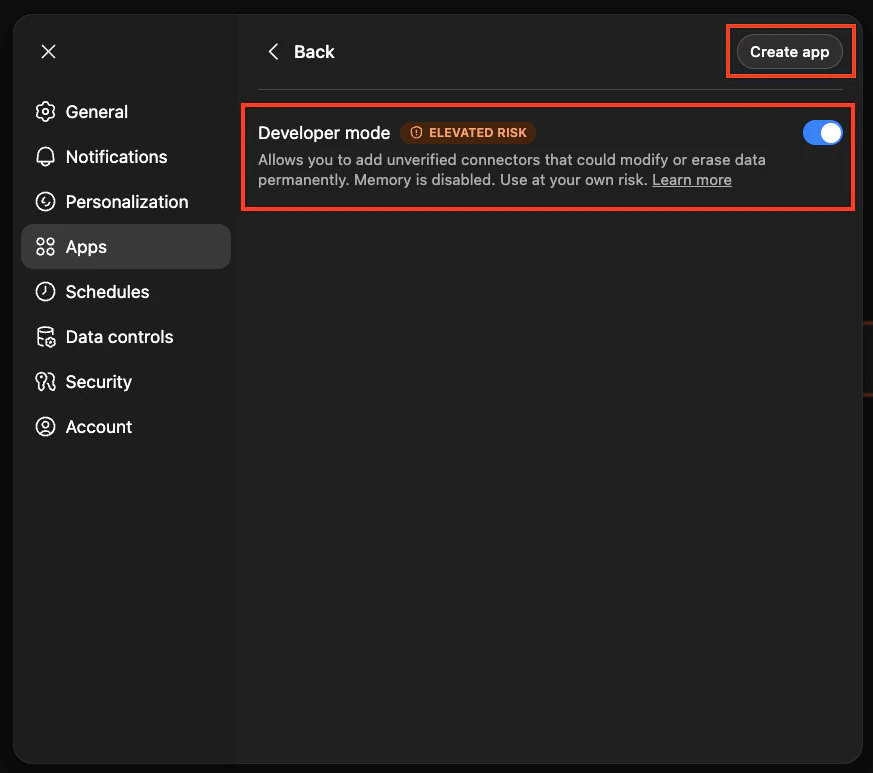
Enable Developer Mode and click Create app
Go to Settings > Apps > Advanced Settings in ChatGPT.
ChatGPT Advanced Settings
2
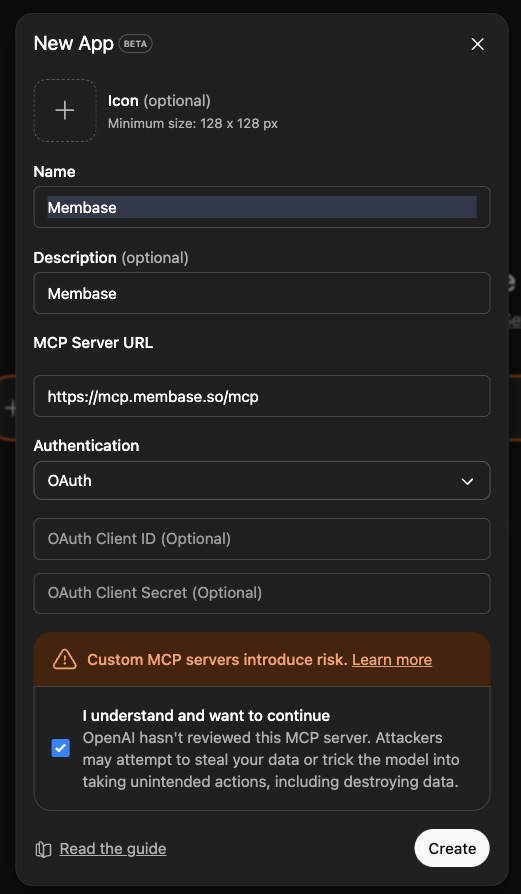
Fill in the following details and click Create
Field
Value
Name
Membase
Description
Membase memory and wiki connector
URL
https://mcp.membase.so/mcp
Authentication
OAuth
ChatGPT app configuration
3
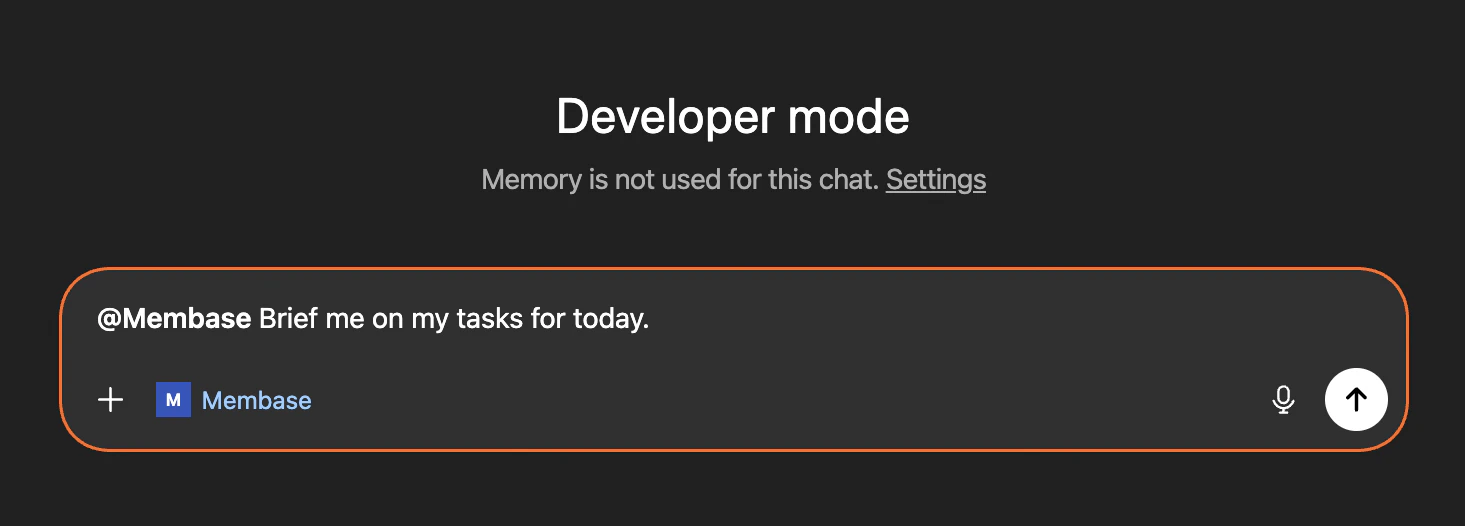
Authenticate and start using Membase in ChatGPT
Try something like: @membase Brief me on my tasks for today.
Chat with Memory, agent retrieval, and dashboard exploration.
Knowledge Wiki
Store factual knowledge alongside your memories.
Membase MCP
See every MCP tool your agent can call.
Was this page helpful?
{"docsConfig":{"theme":"aspen","$schema":"https://mintlify.com/docs.json","name":"Membase","description":"Persistent, shared memory for your AI agents.","colors":{"primary":"#229EFF","light":"#1A8DE6","dark":"#229EFF"},"logo":{"light":"https://mintcdn.com/aristo_2/9bbNV6ZLOD_5hYTx/logo/light.png?fit=max\u0026auto=format\u0026n=9bbNV6ZLOD_5hYTx\u0026q=85\u0026s=c0036161b1567cf4553281a50465364f","dark":"https://mintcdn.com/aristo_2/9bbNV6ZLOD_5hYTx/logo/dark.png?fit=max\u0026auto=format\u0026n=9bbNV6ZLOD_5hYTx\u0026q=85\u0026s=d3bc9a972e3427a316ee6ebd7dbccf79","href":"https://docs.membase.so"},"favicon":"https://mintcdn.com/aristo_2/9bbNV6ZLOD_5hYTx/images/logos/favicon.png?fit=max\u0026auto=format\u0026n=9bbNV6ZLOD_5hYTx\u0026q=85\u0026s=2752bdf23d5f5aa136406f3124c8000a","appearance":{"default":"system","strict":false},"background":{"decoration":"windows"},"navbar":{"links":[{"href":"https://docs.membase.so/support/faqs","label":"Support"}],"primary":{"type":"button","label":"Go to Dashboard","href":"https://app.membase.so"}},"footer":{"socials":{"discord":"https://discord.gg/vHgtDd6UTK","x":"https://x.com/intent/follow?screen_name=mem_base","github":"https://github.com/aristoapp/membase","linkedin":"https://www.linkedin.com/company/aristo"}},"contextual":{"options":["copy","view","chatgpt","claude","perplexity","mcp","cursor","vscode"],"display":"header"},"styling":{"latex":false},"navigation":{"global":{"anchors":[{"anchor":"Changelog","icon":"clock-rotate-left","href":"https://docs.membase.so/changelog/index"},{"anchor":"Community","icon":"discord","href":"https://discord.gg/vHgtDd6UTK"}]},"pages":[]}},"deployment":{"deploymentMetadataValue":{"subdomain":"aristo_2","hasAudioNarration":false,"actualSubdomain":"aristo_2","customDomains":["docs.membase.so"],"gitSource":{"type":"github","owner":"aristoapp","repo":"membase-core","deployBranch":"docs","contentDirectory":"apps/docs","isPrivate":true,"mountPath":"","label":""},"chroma":{"liveDeploymentHistoryId":"6a55842209b6111cdf76e753","collectionId":"d8fb1158-62a4-490d-9a5c-28d35afcc44e","schemaVersion":"v3"},"feedback":{"thumbs":true},"entitlements":{},"buildId":"6a55842209b6111cdf76e753:success","clientVersion":"0.0.3933","searchFilterCounts":[{"language":"default","tag":"Guides","count":25},{"language":"default","tag":"Connectors","count":13},{"language":"default","tag":"Agents","count":10},{"language":"default","tag":"Features","count":4},{"language":"default","tag":"Getting Started","count":4},{"language":"default","tag":"Changelog","count":2},{"language":"default","tag":"Core Concepts","count":2},{"language":"default","tag":"Support","count":2}]},"assistantConfig":{"enableAskAiButton":false,"enableStarterQuestions":false,"enableAskAiSearchBar":true},"hasChatPermissions":false,"hasWebMcpPermissions":false,"toggles":[{"name":"kill-isr","enabled":true,"variant":{"name":"disabled","enabled":false,"feature_enabled":true},"impressionData":false},{"name":"agent-mintlify-slack","enabled":true,"variant":{"name":"disabled","enabled":false,"feature_enabled":true},"impressionData":false},{"name":"editor-v7-file-tree","enabled":true,"variant":{"name":"disabled","enabled":false,"feature_enabled":true},"impressionData":false},{"name":"agent-integrations-settings","enabled":true,"variant":{"name":"disabled","enabled":false,"feature_enabled":true},"impressionData":false},{"name":"automations-pr-grouping","enabled":true,"variant":{"name":"disabled","enabled":false,"feature_enabled":true},"impressionData":false},{"name":"custom-prefix","enabled":true,"variant":{"name":"disabled","enabled":false,"feature_enabled":true},"impressionData":false},{"name":"analytics-v7","enabled":true,"variant":{"name":"disabled","enabled":false,"feature_enabled":true},"impressionData":false},{"name":"user-flows-analytics","enabled":true,"variant":{"name":"disabled","enabled":false,"feature_enabled":true},"impressionData":false},{"name":"no-publish-flow","enabled":true,"variant":{"name":"disabled","enabled":false,"feature_enabled":true},"impressionData":false},{"name":"workos-onboarding","enabled":true,"variant":{"name":"disabled","enabled":false,"feature_enabled":true},"impressionData":false},{"name":"llms-txt-v2","enabled":true,"variant":{"name":"disabled","enabled":false,"feature_enabled":true},"impressionData":false},{"name":"pause-universal-search-reconcile","enabled":true,"variant":{"name":"disabled","enabled":false,"feature_enabled":true},"impressionData":false},{"name":"snapshot-serving-live","enabled":true,"variant":{"name":"disabled","enabled":false,"feature_enabled":true},"impressionData":false},{"name":"stripTemperatureMiddleware","enabled":true,"variant":{"name":"disabled","enabled":false,"feature_enabled":true},"impressionData":false},{"name":"per-site-search-delta","enabled":true,"variant":{"name":"disabled","enabled":false,"feature_enabled":true},"impressionData":false},{"name":"support-platform-pylon-zendesk","enabled":true,"variant":{"name":"disabled","enabled":false,"feature_enabled":true},"impressionData":false},{"name":"snapshot-serving","enabled":true,"variant":{"name":"disabled","enabled":false,"feature_enabled":true},"impressionData":false},{"name":"instant-rollback","enabled":true,"variant":{"name":"disabled","enabled":false,"feature_enabled":true},"impressionData":false},{"name":"granular-notifications-server","enabled":true,"variant":{"name":"disabled","enabled":false,"feature_enabled":true},"impressionData":false},{"name":"granular-notifications","enabled":true,"variant":{"name":"disabled","enabled":false,"feature_enabled":true},"impressionData":false},{"name":"editor-private-page-search","enabled":true,"variant":{"name":"disabled","enabled":false,"feature_enabled":true},"impressionData":false},{"name":"automations-fable","enabled":true,"variant":{"name":"disabled","enabled":false,"feature_enabled":true},"impressionData":false},{"name":"fixed-ai-action-pricing","enabled":true,"variant":{"name":"disabled","enabled":false,"feature_enabled":true},"impressionData":false},{"name":"automation-resolve-merge-conflict","enabled":true,"variant":{"name":"disabled","enabled":false,"feature_enabled":true},"impressionData":false},{"name":"scoped-publishing","enabled":true,"variant":{"name":"disabled","enabled":false,"feature_enabled":true},"impressionData":false},{"name":"mintql","enabled":true,"variant":{"name":"disabled","enabled":false,"feature_enabled":true},"impressionData":false},{"name":"page-level-analytics","enabled":true,"variant":{"name":"disabled","enabled":false,"feature_enabled":true},"impressionData":false},{"name":"editor-version-history-v2","enabled":true,"variant":{"name":"disabled","enabled":false,"feature_enabled":true},"impressionData":false},{"name":"editor-nav-generations","enabled":true,"variant":{"name":"disabled","enabled":false,"feature_enabled":true},"impressionData":false},{"name":"billing-page-v2","enabled":true,"variant":{"name":"disabled","enabled":false,"feature_enabled":true},"impressionData":false},{"name":"vite-origin","enabled":true,"variant":{"name":"disabled","enabled":false,"feature_enabled":true},"impressionData":false},{"name":"workspace-projects","enabled":true,"variant":{"name":"disabled","enabled":false,"feature_enabled":true},"impressionData":false},{"name":"assistant-v5","enabled":true,"variant":{"name":"disabled","enabled":false,"feature_enabled":true},"impressionData":false},{"name":"byok-sep-25","enabled":true,"variant":{"name":"disabled","enabled":false,"feature_enabled":true},"impressionData":false},{"name":"fork-pr-previews","enabled":true,"variant":{"name":"disabled","enabled":false,"feature_enabled":true},"impressionData":false},{"name":"revalidation-jwt","enabled":true,"variant":{"name":"disabled","enabled":false,"feature_enabled":true},"impressionData":false},{"name":"editor-agent-model-picker","enabled":true,"variant":{"name":"disabled","enabled":false,"feature_enabled":true},"impressionData":false},{"name":"billing-updated-9-15","enabled":true,"variant":{"name":"disabled","enabled":false,"feature_enabled":true},"impressionData":false},{"name":"hobby-abuse-scan","enabled":true,"variant":{"name":"disabled","enabled":false,"feature_enabled":true},"impressionData":false},{"name":"dashboard-inbox","enabled":true,"variant":{"name":"disabled","enabled":false,"feature_enabled":true},"impressionData":false}],"isAtlas":false,"googleFontsInlined":false},"customCss":[],"page":{"pagePath":"connectors/agents/chatgpt","slug":"/connectors/agents/chatgpt","pageMetadata":{"title":"ChatGPT","sidebarTitle":"ChatGPT","description":"Connect Membase to ChatGPT as a custom app using MCP. Give ChatGPT persistent memory that remembers your preferences and context across every conversation.","href":"/connectors/agents/chatgpt"},"description":{"compiledSource":"\"use strict\";\nconst {jsx: _jsx} = arguments[0];\nconst {useMDXComponents: _provideComponents} = arguments[0];\nfunction _createMdxContent(props) {\n const _components = {\n p: \"p\",\n ..._provideComponents(),\n ...props.components\n };\n return _jsx(_components.p, {\n children: \"Connect Membase to ChatGPT as a custom app using MCP. Give ChatGPT persistent memory that remembers your preferences and context across every conversation.\"\n });\n}\nfunction MDXContent(props = {}) {\n const {wrapper: MDXLayout} = {\n ..._provideComponents(),\n ...props.components\n };\n return MDXLayout ? _jsx(MDXLayout, {\n ...props,\n children: _jsx(_createMdxContent, {\n ...props\n })\n }) : _createMdxContent(props);\n}\nreturn {\n default: MDXContent\n};\n","frontmatter":{},"scope":{}},"pageType":"default","mdx":{"mdxSource":{"compiledSource":"\"use strict\";const{Fragment:_Fragment,jsx:_jsx,jsxs:_jsxs}=arguments[0];const{useMDXComponents:_provideComponents}=arguments[0];function _createMdxContent(props){const _components={code:`code`,p:`p`,strong:`strong`,tbody:`tbody`,td:`td`,th:`th`,thead:`thead`,tr:`tr`,..._provideComponents(),...props.components},{Card,CardGroup,Frame,Heading,OptimizedImage,Step,Steps,Table,Warning}=_components;if(!Card)_missingMdxReference(`Card`,true);if(!CardGroup)_missingMdxReference(`CardGroup`,true);if(!Frame)_missingMdxReference(`Frame`,true);if(!Heading)_missingMdxReference(`Heading`,true);if(!OptimizedImage)_missingMdxReference(`OptimizedImage`,true);if(!Step)_missingMdxReference(`Step`,true);if(!Steps)_missingMdxReference(`Steps`,true);if(!Table)_missingMdxReference(`Table`,true);if(!Warning)_missingMdxReference(`Warning`,true);return _jsxs(_Fragment,{children:[_jsx(Warning,{children:_jsx(_components.p,{children:`ChatGPT custom apps/connectors require a ChatGPT plan that supports custom connectors. If the Apps settings are not available, check your ChatGPT plan.`})}),`\n`,_jsxs(Steps,{children:[_jsxs(Step,{title:`Enable Developer Mode and click Create app`,children:[_jsxs(_components.p,{children:[`Go to `,_jsx(_components.strong,{children:`Settings > Apps > Advanced Settings`}),` in ChatGPT.`]}),_jsx(Frame,{caption:`ChatGPT Advanced Settings`,children:_jsx(OptimizedImage,{src:`https://mintcdn.com/aristo_2/SyC5fNZLZj3t6Psb/images/installation/chatgpt-step1.png?fit=max\u0026auto=format\u0026n=SyC5fNZLZj3t6Psb\u0026q=85\u0026s=1c6ed2f82f92149505a4aaab7bd93ea2`,alt:`ChatGPT Advanced Settings`,\"data-og-width\":`873`,width:`873`,\"data-og-height\":`773`,height:`773`,\"data-path\":`images/installation/chatgpt-step1.png`,\"data-optimize\":`true`,\"data-opv\":`3`,srcset:`https://mintcdn.com/aristo_2/SyC5fNZLZj3t6Psb/images/installation/chatgpt-step1.png?w=280\u0026fit=max\u0026auto=format\u0026n=SyC5fNZLZj3t6Psb\u0026q=85\u0026s=86378d867e215ac68bf34baf900d32e8 280w, https://mintcdn.com/aristo_2/SyC5fNZLZj3t6Psb/images/installation/chatgpt-step1.png?w=560\u0026fit=max\u0026auto=format\u0026n=SyC5fNZLZj3t6Psb\u0026q=85\u0026s=49b9fac2c44a2293826871c15fd00bc5 560w, https://mintcdn.com/aristo_2/SyC5fNZLZj3t6Psb/images/installation/chatgpt-step1.png?w=840\u0026fit=max\u0026auto=format\u0026n=SyC5fNZLZj3t6Psb\u0026q=85\u0026s=3d1165984bac3997cbb3bb7e9c13953e 840w, https://mintcdn.com/aristo_2/SyC5fNZLZj3t6Psb/images/installation/chatgpt-step1.png?w=1100\u0026fit=max\u0026auto=format\u0026n=SyC5fNZLZj3t6Psb\u0026q=85\u0026s=ae60df10affcb58111175398661ed05a 1100w, https://mintcdn.com/aristo_2/SyC5fNZLZj3t6Psb/images/installation/chatgpt-step1.png?w=1650\u0026fit=max\u0026auto=format\u0026n=SyC5fNZLZj3t6Psb\u0026q=85\u0026s=385ed119409e49f130a01e7796283c5c 1650w, https://mintcdn.com/aristo_2/SyC5fNZLZj3t6Psb/images/installation/chatgpt-step1.png?w=2500\u0026fit=max\u0026auto=format\u0026n=SyC5fNZLZj3t6Psb\u0026q=85\u0026s=ee5b44f3fd15dd9bc71853a3e53e921a 2500w`})})]}),_jsxs(Step,{title:`Fill in the following details and click Create`,children:[_jsxs(Table,{children:[_jsx(_components.thead,{children:_jsxs(_components.tr,{children:[_jsx(_components.th,{children:`Field`}),_jsx(_components.th,{children:`Value`})]})}),_jsxs(_components.tbody,{children:[_jsxs(_components.tr,{children:[_jsx(_components.td,{children:`Name`}),_jsx(_components.td,{children:_jsx(_components.code,{children:`Membase`})})]}),_jsxs(_components.tr,{children:[_jsx(_components.td,{children:`Description`}),_jsx(_components.td,{children:_jsx(_components.code,{children:`Membase memory and wiki connector`})})]}),_jsxs(_components.tr,{children:[_jsx(_components.td,{children:`URL`}),_jsx(_components.td,{children:_jsx(_components.code,{children:`https://mcp.membase.so/mcp`})})]}),_jsxs(_components.tr,{children:[_jsx(_components.td,{children:`Authentication`}),_jsx(_components.td,{children:_jsx(_components.code,{children:`OAuth`})})]})]})]}),_jsx(Frame,{caption:`ChatGPT app configuration`,children:_jsx(OptimizedImage,{src:`https://mintcdn.com/aristo_2/SyC5fNZLZj3t6Psb/images/installation/chatgpt-step2.png?fit=max\u0026auto=format\u0026n=SyC5fNZLZj3t6Psb\u0026q=85\u0026s=31ae7262287cb2049932e9a360d2bf40`,alt:`ChatGPT app configuration`,\"data-og-width\":`521`,width:`521`,\"data-og-height\":`894`,height:`894`,\"data-path\":`images/installation/chatgpt-step2.png`,\"data-optimize\":`true`,\"data-opv\":`3`,srcset:`https://mintcdn.com/aristo_2/SyC5fNZLZj3t6Psb/images/installation/chatgpt-step2.png?w=280\u0026fit=max\u0026auto=format\u0026n=SyC5fNZLZj3t6Psb\u0026q=85\u0026s=c7ce799b00342cd5c7c2b682bbba47a5 280w, https://mintcdn.com/aristo_2/SyC5fNZLZj3t6Psb/images/installation/chatgpt-step2.png?w=560\u0026fit=max\u0026auto=format\u0026n=SyC5fNZLZj3t6Psb\u0026q=85\u0026s=80a27ab170076b7b5897203872c94cb1 560w, https://mintcdn.com/aristo_2/SyC5fNZLZj3t6Psb/images/installation/chatgpt-step2.png?w=840\u0026fit=max\u0026auto=format\u0026n=SyC5fNZLZj3t6Psb\u0026q=85\u0026s=e19ba475a1f21e7a6bef203ce4df0db8 840w, https://mintcdn.com/aristo_2/SyC5fNZLZj3t6Psb/images/installation/chatgpt-step2.png?w=1100\u0026fit=max\u0026auto=format\u0026n=SyC5fNZLZj3t6Psb\u0026q=85\u0026s=67999082776874d606f419cd86fa9dbd 1100w, https://mintcdn.com/aristo_2/SyC5fNZLZj3t6Psb/images/installation/chatgpt-step2.png?w=1650\u0026fit=max\u0026auto=format\u0026n=SyC5fNZLZj3t6Psb\u0026q=85\u0026s=991fb4dd4828fbe3e627740ff166725b 1650w, https://mintcdn.com/aristo_2/SyC5fNZLZj3t6Psb/images/installation/chatgpt-step2.png?w=2500\u0026fit=max\u0026auto=format\u0026n=SyC5fNZLZj3t6Psb\u0026q=85\u0026s=45d23459d726168afba8d31ed8233cc7 2500w`})})]}),_jsxs(Step,{title:`Authenticate and start using Membase in ChatGPT`,children:[_jsxs(_components.p,{children:[`Try something like: `,_jsx(_components.code,{children:`@membase Brief me on my tasks for today.`})]}),_jsx(Frame,{caption:`Using Membase in ChatGPT`,children:_jsx(OptimizedImage,{src:`https://mintcdn.com/aristo_2/SyC5fNZLZj3t6Psb/images/installation/chatgpt-step3.png?fit=max\u0026auto=format\u0026n=SyC5fNZLZj3t6Psb\u0026q=85\u0026s=45769d97a7019ba6ab2d959870a78058`,alt:`Using Membase in ChatGPT`,\"data-og-width\":`1465`,width:`1465`,\"data-og-height\":`526`,height:`526`,\"data-path\":`images/installation/chatgpt-step3.png`,\"data-optimize\":`true`,\"data-opv\":`3`,srcset:`https://mintcdn.com/aristo_2/SyC5fNZLZj3t6Psb/images/installation/chatgpt-step3.png?w=280\u0026fit=max\u0026auto=format\u0026n=SyC5fNZLZj3t6Psb\u0026q=85\u0026s=9f9cda8e49098cdb6994cfb271e42903 280w, https://mintcdn.com/aristo_2/SyC5fNZLZj3t6Psb/images/installation/chatgpt-step3.png?w=560\u0026fit=max\u0026auto=format\u0026n=SyC5fNZLZj3t6Psb\u0026q=85\u0026s=82c3503f7549adf997f296bbd88a920d 560w, https://mintcdn.com/aristo_2/SyC5fNZLZj3t6Psb/images/installation/chatgpt-step3.png?w=840\u0026fit=max\u0026auto=format\u0026n=SyC5fNZLZj3t6Psb\u0026q=85\u0026s=bb2b95e8972ee352f6aa56b90e978e81 840w, https://mintcdn.com/aristo_2/SyC5fNZLZj3t6Psb/images/installation/chatgpt-step3.png?w=1100\u0026fit=max\u0026auto=format\u0026n=SyC5fNZLZj3t6Psb\u0026q=85\u0026s=c67b92915cec0f33bb2f05c0b8a9cc53 1100w, https://mintcdn.com/aristo_2/SyC5fNZLZj3t6Psb/images/installation/chatgpt-step3.png?w=1650\u0026fit=max\u0026auto=format\u0026n=SyC5fNZLZj3t6Psb\u0026q=85\u0026s=8620f754772f5981009c1440547567ce 1650w, https://mintcdn.com/aristo_2/SyC5fNZLZj3t6Psb/images/installation/chatgpt-step3.png?w=2500\u0026fit=max\u0026auto=format\u0026n=SyC5fNZLZj3t6Psb\u0026q=85\u0026s=606d0aa76341b7f9df3f62f69955642b 2500w`})})]})]}),`\n`,_jsx(Heading,{level:`2`,id:`next-steps`,children:`Next Steps`}),`\n`,_jsxs(CardGroup,{cols:2,children:[_jsx(Card,{title:`Bring Your Context`,icon:`download`,href:`/getting-started/bring-context`,children:_jsx(_components.p,{children:`Import chat history, connect apps, and more.`})}),_jsx(Card,{title:`Use Your Context`,icon:`comment-dots`,href:`/getting-started/use-context`,children:_jsx(_components.p,{children:`Chat with Memory, agent retrieval, and dashboard exploration.`})}),_jsx(Card,{title:`Knowledge Wiki`,icon:`book`,href:`/features/wiki`,children:_jsx(_components.p,{children:`Store factual knowledge alongside your memories.`})}),_jsx(Card,{title:`Membase MCP`,icon:`link`,href:`/features/membase-mcp`,children:_jsx(_components.p,{children:`See every MCP tool your agent can call.`})})]})]})}function MDXContent(props={}){const{wrapper:MDXLayout}={..._provideComponents(),...props.components};return MDXLayout?_jsx(MDXLayout,{...props,children:_jsx(_createMdxContent,{...props})}):_createMdxContent(props)}return{default:MDXContent};function _missingMdxReference(id,component){throw new Error(`Expected `+(component?`component`:`object`)+\" `\"+id+\"` to be defined: you likely forgot to import, pass, or provide it.\")}","frontmatter":{},"scope":{"config":{},"pageMetadata":{"title":"ChatGPT","sidebarTitle":"ChatGPT","description":"Connect Membase to ChatGPT as a custom app using MCP. Give ChatGPT persistent memory that remembers your preferences and context across every conversation.","href":"/connectors/agents/chatgpt"}}},"mdxSourceWithNoJs":null},"mdxExtracts":{"tableOfContents":[{"title":"Next Steps","slug":"next-steps","depth":2,"children":[]}],"codeExamples":{}},"jsLinks":[],"subdomain":"aristo--5f--2","siteName":"Membase","title":"ChatGPT - Membase","navMaps":{"firstHrefInVersion":{},"firstHrefInLanguage":{}},"lastModified":"2026-05-06T04:30:59.874Z","originalFileLocation":"connectors/agents/chatgpt.mdx"},"headHtml":"\u003cscript data-mint-head>(function(){var d=document.documentElement,p=null;if(!p){try{p=localStorage.getItem(\"isDarkMode\")}catch(e){}if(p==='true')p='dark';else if(p==='false')p='light';if(p!=='light'\u0026\u0026p!=='dark'\u0026\u0026p!=='system')p=\"system\"}var r=p==='system'?(matchMedia(\"(prefers-color-scheme: dark)\").matches?'dark':'light'):p;d.classList.remove(r==='dark'?'light':'dark');d.classList.add(r);d.setAttribute(\"data-theme-preference\",p)})();\u003c/script>\u003cmeta data-mint-head name=\"description\" content=\"Connect Membase to ChatGPT as a custom app using MCP. Give ChatGPT persistent memory that remembers your preferences and context across every conversation.\">\u003cmeta data-mint-head name=\"application-name\" content=\"Membase\">\u003cmeta data-mint-head name=\"generator\" content=\"Mintlify\">\u003clink data-mint-head rel=\"icon\" type=\"image/png\" sizes=\"192x192\" href=\"/mintlify-assets/_mintlify/favicons/aristo_2/E2N6yghF4zpbuwju/_generated/favicon/android-chrome-192x192.png\" media=\"(prefers-color-scheme: light)\">\u003clink data-mint-head rel=\"apple-touch-icon\" type=\"image/png\" sizes=\"180x180\" href=\"/mintlify-assets/_mintlify/favicons/aristo_2/E2N6yghF4zpbuwju/_generated/favicon/apple-touch-icon.png\">\u003clink data-mint-head rel=\"icon\" type=\"image/png\" sizes=\"16x16\" href=\"/mintlify-assets/_mintlify/favicons/aristo_2/E2N6yghF4zpbuwju/_generated/favicon/favicon-16x16.png\" media=\"(prefers-color-scheme: light)\">\u003clink data-mint-head rel=\"icon\" type=\"image/png\" sizes=\"32x32\" href=\"/mintlify-assets/_mintlify/favicons/aristo_2/E2N6yghF4zpbuwju/_generated/favicon/favicon-32x32.png\" media=\"(prefers-color-scheme: light)\">\u003clink data-mint-head rel=\"shortcut icon\" type=\"image/x-icon\" href=\"/mintlify-assets/_mintlify/favicons/aristo_2/E2N6yghF4zpbuwju/_generated/favicon/favicon.ico\" media=\"(prefers-color-scheme: light)\">\u003clink data-mint-head rel=\"icon\" type=\"image/png\" sizes=\"192x192\" href=\"/mintlify-assets/_mintlify/favicons/aristo_2/E2N6yghF4zpbuwju/_generated/favicon-dark/android-chrome-192x192.png\" media=\"(prefers-color-scheme: dark)\">\u003clink data-mint-head rel=\"icon\" type=\"image/png\" sizes=\"16x16\" href=\"/mintlify-assets/_mintlify/favicons/aristo_2/E2N6yghF4zpbuwju/_generated/favicon-dark/favicon-16x16.png\" media=\"(prefers-color-scheme: dark)\">\u003clink data-mint-head rel=\"icon\" type=\"image/png\" sizes=\"32x32\" href=\"/mintlify-assets/_mintlify/favicons/aristo_2/E2N6yghF4zpbuwju/_generated/favicon-dark/favicon-32x32.png\" media=\"(prefers-color-scheme: dark)\">\u003clink data-mint-head rel=\"shortcut icon\" type=\"image/x-icon\" href=\"/mintlify-assets/_mintlify/favicons/aristo_2/E2N6yghF4zpbuwju/_generated/favicon-dark/favicon.ico\" media=\"(prefers-color-scheme: dark)\">\u003cmeta data-mint-head property=\"og:title\" content=\"ChatGPT - Membase\">\u003cmeta data-mint-head property=\"og:description\" content=\"Connect Membase to ChatGPT as a custom app using MCP. Give ChatGPT persistent memory that remembers your preferences and context across every conversation.\">\u003cmeta data-mint-head property=\"og:site_name\" content=\"Membase\">\u003cmeta data-mint-head property=\"og:url\" content=\"https://docs.membase.so/connectors/agents/chatgpt\">\u003cmeta data-mint-head property=\"og:type\" content=\"website\">\u003cmeta data-mint-head property=\"og:image\" content=\"https://aristo_2.mintlify.app/_mintlify/api/og/v2?division=Agents\u0026amp;title=ChatGPT\u0026amp;description=Connect+Membase+to+ChatGPT+as+a+custom+app+using+MCP.+Give+ChatGPT+persistent+memory+that+remembers+your+preferences+and+context+across+every+conversation.\u0026amp;theme=e455043187cf52e15a1276a3\u0026amp;signature=39ec523f629a8c4eb5d1de8402f4101eafaf8823481fa824aad66276f41b99b9\">\u003cmeta data-mint-head property=\"og:image:width\" content=\"1200\">\u003cmeta data-mint-head property=\"og:image:height\" content=\"630\">\u003cmeta data-mint-head name=\"twitter:card\" content=\"summary_large_image\">\u003cmeta data-mint-head name=\"twitter:title\" content=\"ChatGPT - Membase\">\u003cmeta data-mint-head name=\"twitter:description\" content=\"Connect Membase to ChatGPT as a custom app using MCP. Give ChatGPT persistent memory that remembers your preferences and context across every conversation.\">\u003cmeta data-mint-head name=\"twitter:image\" content=\"https://aristo_2.mintlify.app/_mintlify/api/og/v2?division=Agents\u0026amp;title=ChatGPT\u0026amp;description=Connect+Membase+to+ChatGPT+as+a+custom+app+using+MCP.+Give+ChatGPT+persistent+memory+that+remembers+your+preferences+and+context+across+every+conversation.\u0026amp;theme=e455043187cf52e15a1276a3\u0026amp;signature=39ec523f629a8c4eb5d1de8402f4101eafaf8823481fa824aad66276f41b99b9\">\u003cmeta data-mint-head name=\"twitter:image:width\" content=\"1200\">\u003cmeta data-mint-head name=\"twitter:image:height\" content=\"630\">\u003cmeta data-mint-head name=\"msapplication-config\" content=\"/mintlify-assets/_mintlify/favicons/aristo_2/E2N6yghF4zpbuwju/_generated/favicon/browserconfig.xml\">\u003cmeta data-mint-head name=\"apple-mobile-web-app-title\" content=\"Membase\">\u003cmeta data-mint-head name=\"msapplication-TileColor\" content=\"#229EFF\">\u003clink data-mint-head rel=\"canonical\" href=\"https://docs.membase.so/connectors/agents/chatgpt\">\u003clink data-mint-head rel=\"alternate\" type=\"application/xml\" href=\"/sitemap.xml\">\u003clink data-mint-head rel=\"alternate\" type=\"text/markdown\" href=\"/connectors/agents/chatgpt.md\">\u003cscript data-mint-head type=\"application/ld+json\">{\"@context\":\"https://schema.org\",\"@graph\":[{\"@type\":\"Organization\",\"@id\":\"https://docs.membase.so/#organization\",\"name\":\"Membase\",\"url\":\"https://docs.membase.so\",\"logo\":{\"@type\":\"ImageObject\",\"url\":\"https://mintcdn.com/aristo_2/9bbNV6ZLOD_5hYTx/logo/light.png?fit=max\u0026auto=format\u0026n=9bbNV6ZLOD_5hYTx\u0026q=85\u0026s=c0036161b1567cf4553281a50465364f\"}},{\"@type\":\"WebSite\",\"@id\":\"https://docs.membase.so#website\",\"name\":\"Membase\",\"url\":\"https://docs.membase.so\",\"publisher\":{\"@id\":\"https://docs.membase.so/#organization\"}},{\"@type\":\"WebPage\",\"@id\":\"https://docs.membase.so/connectors/agents/chatgpt#webpage\",\"url\":\"https://docs.membase.so/connectors/agents/chatgpt\",\"name\":\"ChatGPT\",\"description\":\"Connect Membase to ChatGPT as a custom app using MCP. Give ChatGPT persistent memory that remembers your preferences and context across every conversation.\",\"dateModified\":\"2026-05-06T04:30:59.874Z\",\"isPartOf\":{\"@id\":\"https://docs.membase.so#website\"},\"breadcrumb\":{\"@id\":\"https://docs.membase.so/connectors/agents/chatgpt#breadcrumb\"}},{\"@type\":\"BreadcrumbList\",\"@id\":\"https://docs.membase.so/connectors/agents/chatgpt#breadcrumb\",\"itemListElement\":[{\"@type\":\"ListItem\",\"position\":1,\"name\":\"Connectors\",\"item\":\"https://docs.membase.so/connectors/agents/cursor\"},{\"@type\":\"ListItem\",\"position\":2,\"name\":\"Agents\",\"item\":\"https://docs.membase.so/connectors/agents/cursor\"},{\"@type\":\"ListItem\",\"position\":3,\"name\":\"ChatGPT\",\"item\":\"https://docs.membase.so/connectors/agents/chatgpt\"}]},{\"@type\":[\"Article\",\"TechArticle\"],\"@id\":\"https://docs.membase.so/connectors/agents/chatgpt#article\",\"headline\":\"ChatGPT\",\"name\":\"ChatGPT\",\"description\":\"Connect Membase to ChatGPT as a custom app using MCP. Give ChatGPT persistent memory that remembers your preferences and context across every conversation.\",\"url\":\"https://docs.membase.so/connectors/agents/chatgpt\",\"mainEntityOfPage\":{\"@id\":\"https://docs.membase.so/connectors/agents/chatgpt#webpage\"},\"dateModified\":\"2026-05-06T04:30:59.874Z\",\"publisher\":{\"@id\":\"https://docs.membase.so/#organization\"},\"isPartOf\":{\"@id\":\"https://docs.membase.so#website\"}}]}\u003c/script>\u003cscript data-mint-head type=\"application/ld+json\">{\"@context\":\"https://schema.org\",\"@type\":\"WebSite\",\"name\":\"Membase\",\"creator\":{\"@type\":\"Organization\",\"name\":\"Mintlify\",\"url\":\"https://mintlify.com\"}}\u003c/script>","siteName":"Membase","nav":{"global":{"anchors":[{"anchor":"Changelog","icon":"clock-rotate-left","href":"https://docs.membase.so/changelog/index"},{"anchor":"Community","icon":"discord","href":"https://discord.gg/vHgtDd6UTK"}]},"tabs":[{"tab":"Guides","groups":[{"group":"Getting Started","pages":[{"title":"Overview","sidebarTitle":"Overview","href":""},{"title":"Quickstart","sidebarTitle":"Quickstart","href":"/getting-started/quickstart"},{"title":"Bring Your Context Into Membase","sidebarTitle":"How to Bring Your Context","href":"/getting-started/bring-context"},{"title":"Use Your Context in Membase","sidebarTitle":"How to Use Your Context","href":"/getting-started/use-context"}]},{"group":"Core Concepts","pages":[{"title":"How Membase Works","sidebarTitle":"How Membase Works","href":"/core-concepts/how-membase-works"},{"title":"Attached vs Universal","sidebarTitle":"Attached vs Universal","href":"/core-concepts/attached-vs-universal"}]},{"group":"Features","pages":[{"title":"Membase MCP","sidebarTitle":"Membase MCP","href":"/features/membase-mcp"},{"title":"Chat in Dashboard","sidebarTitle":"Chat","href":"/features/chat"},{"title":"Memory","sidebarTitle":"Memory","href":"/features/memory"},{"title":"Knowledge Wiki","sidebarTitle":"Wiki","href":"/features/wiki"}]},{"group":"Connectors","pages":[{"group":"Agents","pages":[{"title":"Cursor","sidebarTitle":"Cursor","description":"Connect Membase to Cursor with one-click MCP setup. You can also use the Membase Cursor plugin for packaged rules and skills.","href":"/connectors/agents/cursor"},{"title":"ChatGPT","sidebarTitle":"ChatGPT","href":"/connectors/agents/chatgpt"},{"title":"Claude","sidebarTitle":"Claude","description":"Connect Membase to Claude as a custom connector. Give Claude persistent memory that carries your context, preferences, and decisions across conversations.","href":"/connectors/agents/claude-desktop"},{"title":"Claude Code","sidebarTitle":"Claude Code","href":"/connectors/agents/claude-code"},{"title":"Codex","sidebarTitle":"Codex","href":"/connectors/agents/codex"},{"title":"VS Code","sidebarTitle":"VS Code","href":"/connectors/agents/vscode"},{"title":"Poke","sidebarTitle":"Poke","href":"/connectors/agents/poke"},{"title":"Gemini CLI","sidebarTitle":"Gemini CLI","href":"/connectors/agents/gemini-cli"},{"title":"OpenCode","sidebarTitle":"OpenCode","href":"/connectors/agents/opencode"},{"title":"Generic MCP URL","sidebarTitle":"MCP URL","href":"/connectors/agents/mcp-url"}]},{"title":"App Integrations","sidebarTitle":"Apps","href":"/connectors/apps"},{"title":"OpenClaw","sidebarTitle":"OpenClaw","href":"/connectors/openclaw"},{"title":"Hermes Agent","sidebarTitle":"Hermes","href":"/connectors/hermes"}]},{"group":"Support","pages":[{"title":"Support \u0026 Troubleshooting","sidebarTitle":"Support \u0026 Troubleshooting","href":"/support/faqs"},{"title":"Contributing","sidebarTitle":"Contributing","href":"/support/contributing"}]}]},{"tab":"Changelog","pages":[{"title":"Changelog","href":"/changelog"}]}]},"title":"ChatGPT - Membase","buildId":"dpl_GnxaU9nEer7XK27kw3dpfPrs9geh","deploymentId":"dpl_GnxaU9nEer7XK27kw3dpfPrs9geh","dynamics":["07c022d89b","a74be98ba7"],"chunks":["Frame-C1EX3v38.js","DynamicMarkdown-BPGty-u8.js","zoom-image-lightbox-Cv5hibpS.js","PlusIcon-owOTCErD.js","lightbox-handle-r17bVUz3.js"]}